How to Calculate AI Coding ROI: A Framework for Engineering Teams
Every engineering leader faces this question at renewal time: "Is this AI coding tool worth what we're paying for it?"
Most teams answer it with a survey. A few answer it with a spreadsheet. Almost none answer it with actual data.
The formula for AI coding ROI isn't complicated. The hard part is knowing which inputs to trust, which numbers most spreadsheets get wrong, and what the result actually tells you vs. what it doesn't.
This post gives you the framework, worked examples, and the three things every AI coding ROI calculation misses.
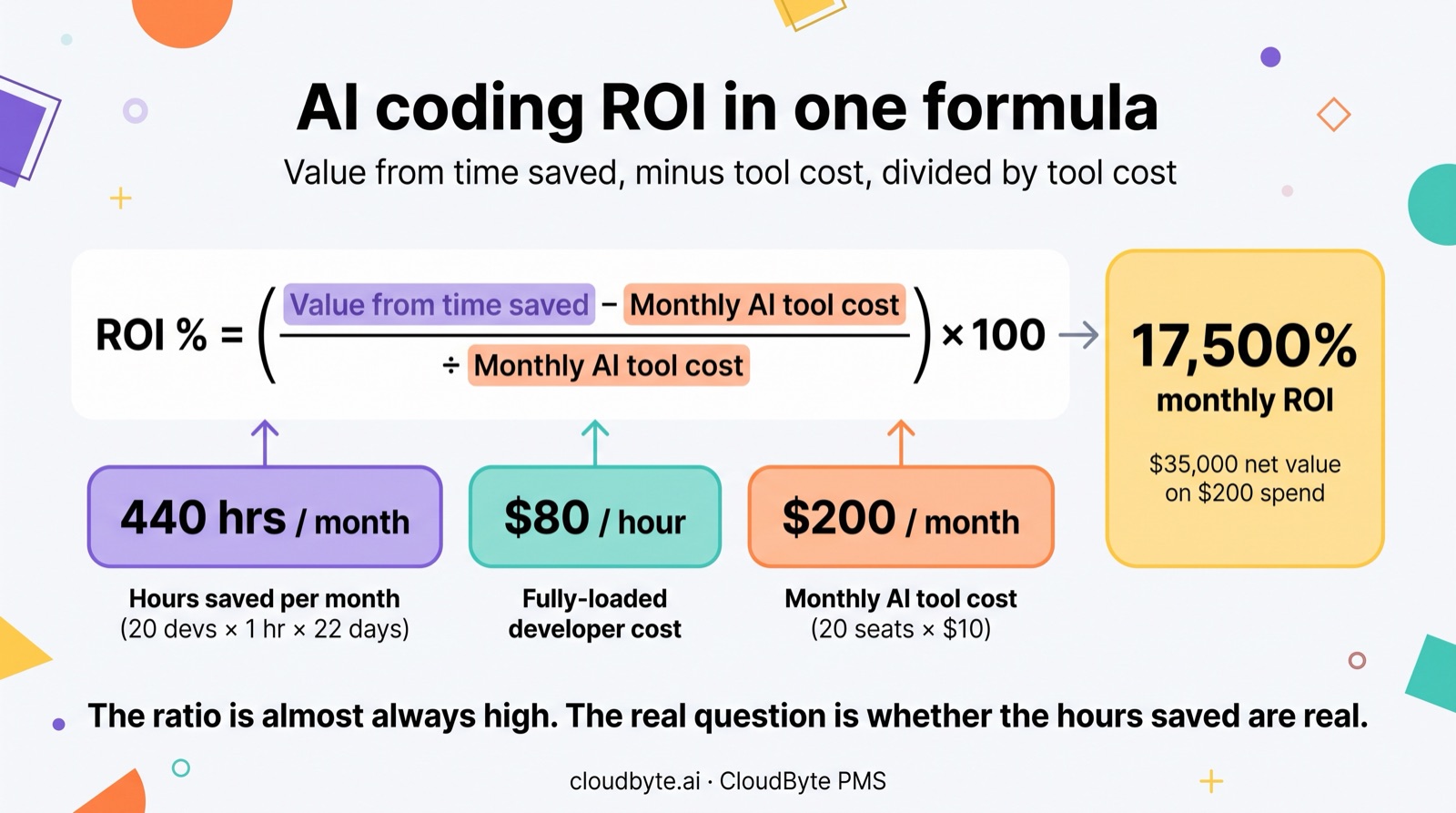
What is the formula for calculating AI coding ROI?
AI coding ROI (%) = ((Hours saved per month × Avg hourly developer cost) − Monthly AI tool cost) / Monthly AI tool cost × 100.
That's the standard ROI formula applied to developer time. Three inputs:
- Hours saved per month — total hours not spent on tasks that AI now handles, across your whole team
- Avg hourly developer cost — fully-loaded cost (salary + benefits + overhead), typically $70–$120/hour for a mid-level engineer on a US-based team
- Monthly AI tool cost — seat subscriptions + API spend for the same period
The result is a percentage. An ROI of 500% means every $1 spent on AI tools produced $5 in recovered developer time. An ROI of 100% means you broke even. Negative means you spent more than you saved.
Why the ratio is almost always high — and why that's not the real question
For most teams, AI coding ROI is strongly positive. The tool cost is low relative to developer salaries. At $10/seat/month for Claude Code, you need a developer to save just 8 minutes per month to recover the seat cost. Any meaningful usage pays for itself immediately.
The real questions are different:
- Is the productivity improvement real or is it a sampling artifact?
- Is it evenly distributed or concentrated in a few high-adopters?
- Are you paying for ghost seats — licensed developers who aren't using the tool?
A high headline ROI number that hides uneven adoption and 20% unused seats is a misleading signal. The framework matters more than the headline.
What data do you need to calculate AI developer productivity?
You need four inputs: active developer count, hours saved per developer per day, fully-loaded hourly cost, and total monthly AI tool spend.
| Input | Description | How to get it |
|---|---|---|
| Active developer count | Developers with ≥1 AI session in the period | AI platform session data or usage report |
| Hours saved per developer/day | Time recovered on AI-assisted tasks | Before/after task timing or session analytics |
| Fully-loaded hourly cost | Salary + benefits + overhead / working hours | Finance or HR; $80–$120/hr typical US mid-level |
| Monthly AI tool cost | API spend + seat subscriptions | AI platform invoice or billing dashboard |
Use active developer count, not licensed seat count. If 20 developers are licensed but only 15 are actively using the tool, your cost denominator is correct (you're paying for all 20) but your hours-saved numerator only reflects 15. Using 20 as the productivity count inflates the estimate. Ghost seats average 24% of AI coding licenses — factor this in before running the numbers.
How to estimate hours saved without a controlled study
Three methods work in practice, in order of precision:
Method 1 — Session analytics (most precise). Tools that record session-level data show you average session length and output (commits, lines changed, files modified). Compare AI-assisted commit output to historical hand-written commit output for the same ticket type. If an AI-assisted commit delivers 2× the changed lines in 0.7× the time, you have a time ratio you can apply to total session count.
Method 2 — Before/after task timing (practical baseline). Pick 10 tickets of a common type (e.g. "add a CRUD endpoint"). Track completion time pre-rollout and post-rollout. Average the ratio. Apply to total ticket volume. Works well if you have a clean pre-rollout baseline period.
Method 3 — Developer survey (fast but rough). Ask "how many hours per week does AI save you?" Average the responses. Expect high variance (some developers say 10 hours, some say 0). The median is more useful than the mean here. Use a conservative multiplier (0.5×) on the median for the headline ROI claim — you want a number you can defend, not the best-case.
What does a typical AI coding ROI calculation look like?
For a 20-person team on Claude Code at $10/seat/month, saving a conservative 1 hour per developer per day, the monthly ROI is approximately 17,500%.
Here's the worked example:
| Input | Value | Notes |
|---|---|---|
| Team size | 20 developers | All active (no ghost seats in this example) |
| Hours saved per developer/day | 1.0 hr | Conservative — below the 1.5 hr our pilot data showed |
| Working days per month | 22 days | Standard |
| Total hours saved per month | 440 hrs | 20 × 1.0 × 22 |
| Fully-loaded hourly cost | $80 /hr | Mid-level engineer, US-based team |
| Monthly value created | $35,200 | 440 × $80 |
| Monthly AI tool cost | $200 | 20 seats × $10/seat |
| ROI | 17,500% | ($35,200 − $200) / $200 × 100 |
The sensitivity to hours-saved is high; the sensitivity to tool cost is low at these numbers:
| Hours saved/dev/day | Monthly value | ROI at $200/month cost |
|---|---|---|
| 0.25 hrs (15 min) | $8,800 | 4,300% |
| 0.5 hrs (30 min) | $17,600 | 8,700% |
| 1.0 hrs | $35,200 | 17,500% |
| 1.5 hrs | $52,800 | 26,300% |
| 2.0 hrs | $70,400 | 35,100% |
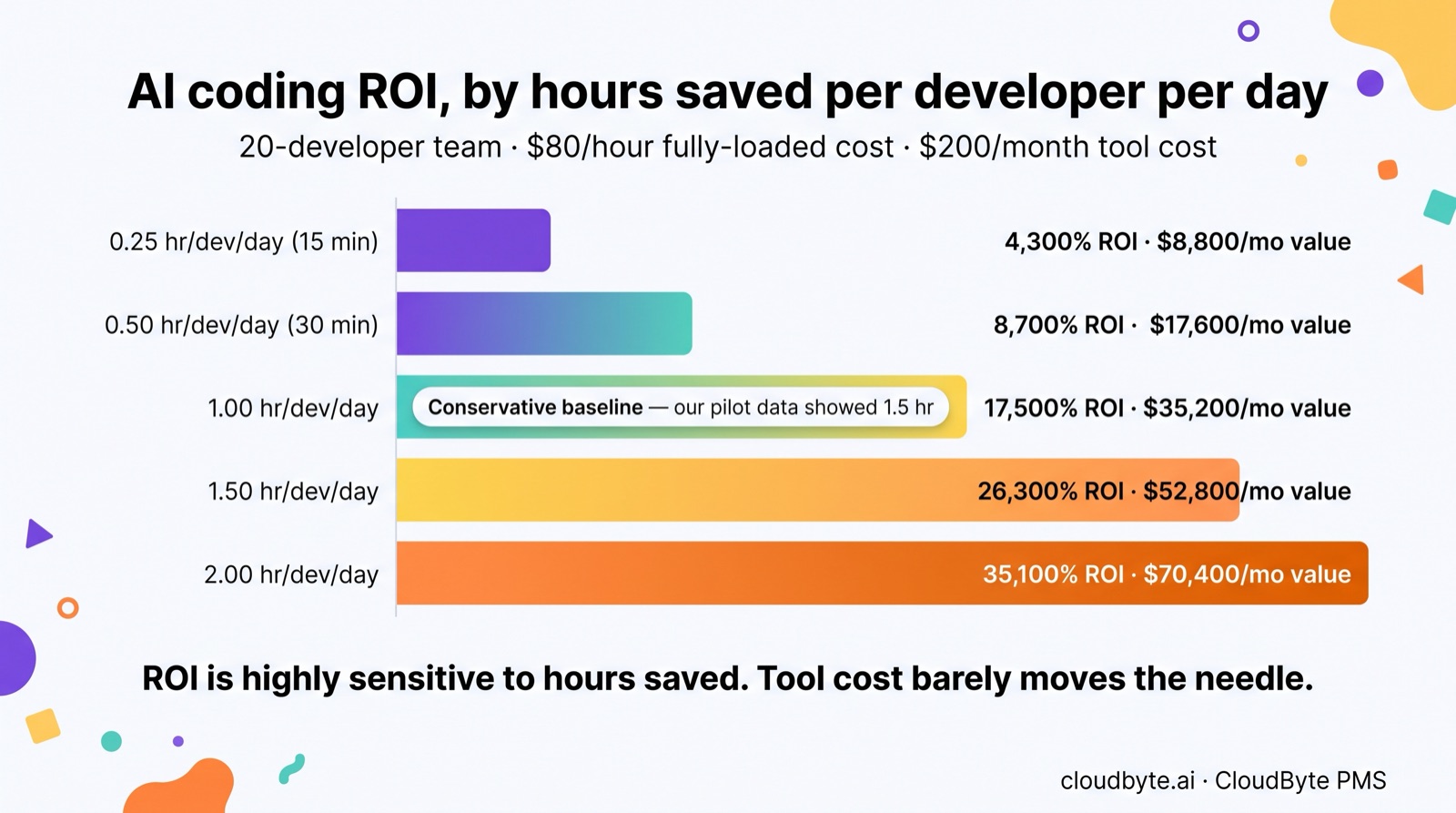
Even at 15 minutes per developer per day — an estimate most teams can defend without any measurement — the ROI is 4,300%. The ROI number is almost never the question. The question is always whether the hours-saved estimate is real.
The ghost seat adjustment
If your team has 20 licensed seats but only 15 active developers, the calculation changes:
| Adjusted input | Value |
|---|---|
| Active developers | 15 (not 20) |
| Hours saved (15 active × 1.0 hr × 22 days) | 330 hrs |
| Monthly value created | $26,400 |
| Monthly cost (still paying for 20 seats) | $200 |
| Adjusted ROI | 13,100% |
Still strongly positive. But you're leaving value on the table — and paying for 5 seats that generate nothing. At $10/seat that's $50/month; at $19/seat Copilot pricing it's $95/month. At enterprise scale with 200-seat contracts, ghost seats are a meaningful budget line.
How does AI coding ROI compare across tool types?
Usage-based tools (Claude Code) make per-developer ROI calculation possible; per-seat tools (GitHub Copilot) make it invisible. Self-hosted LLMs shift cost from OpEx to CapEx without eliminating it.
| Tool type | Cost model | Cost/developer/month | ROI visibility | Ghost seat risk |
|---|---|---|---|---|
| Claude Code (usage-based) | Per token + optional BYOK | $8–$45 (varies by usage) | High — session-level data | Low — inactive developers cost nothing |
| GitHub Copilot (per-seat) | $19/seat/month | $19 fixed | Low — adoption invisible without 3rd-party tool | High — inactive seats cost full price |
| Self-hosted LLM (GPU) | GPU infra + ops | $150–$400/dev/month at 20-dev scale | Medium — usage visible, attributable | None — shared infrastructure |
| Inline-only AI tools | Per-seat | $10–$30/seat | Low — completion rate only | Medium |
The key operational difference: Claude Code's usage-based model creates a cost signal per session and per PR, which makes it possible to calculate cost-per-commit, cost-per-story-point, and cost-per-developer at the individual level. GitHub Copilot's per-seat model hides usage — you know what you paid, but not what each developer produced with it.
For an ROI spreadsheet, this means Claude Code deployments have richer data inputs. Copilot deployments require a measurement layer (like CloudByte PMS or GitHub's native analytics) to get any per-developer signal at all.
What does an AI tool ROI spreadsheet typically miss?
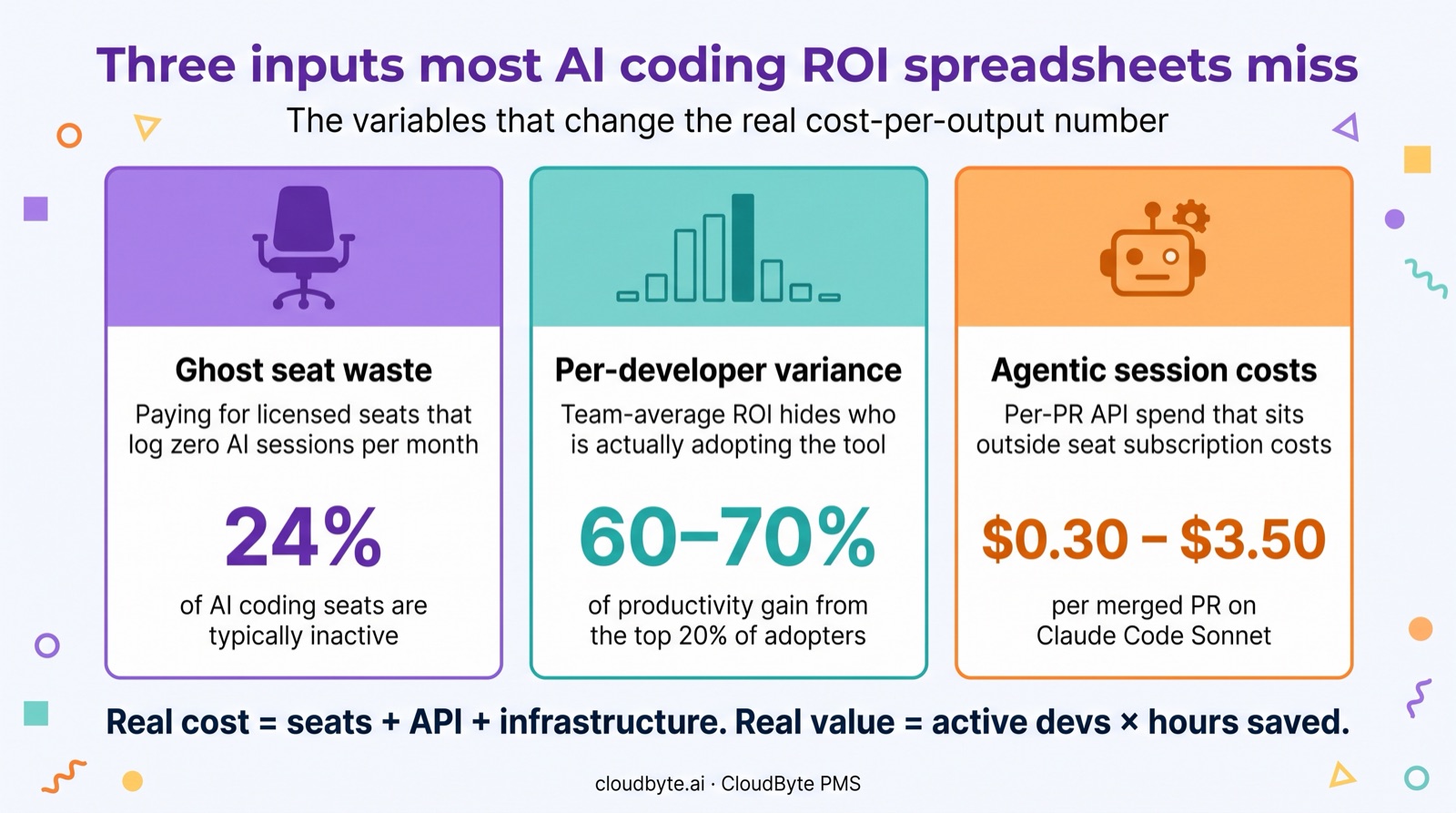
Most AI coding ROI spreadsheets miss ghost seat waste, per-developer productivity variance, and agentic session costs — the three inputs that most change the real cost-per-output number.
Ghost seat waste
The cost denominator in your ROI calculation should reflect real spend divided by real output. If 20% of your seats are inactive, you're paying full cost for zero productivity on those seats. The $200/month Claude Code team cost becomes $160/month productive and $40/month wasted — which matters at scale.
Identifying and reclaiming ghost seats is usually the fastest payback action in any AI tool audit. Session data shows within one billing cycle which developers haven't logged a single AI session.
If your team runs more than one AI coding tool, the per-tool split matters as much as the total. Comparing GitHub Copilot and Claude Code ROI per seat covers how to attribute output when one tool is seat-billed and the other is token-billed.
Per-developer productivity variance
Team-level ROI averages hide wide distributions. In our sprint velocity data, the top 20% of developers by AI adoption accounted for 60–70% of the productivity gain. A team average of 1 hour/day saved might mean 5 developers saving 3 hours/day and 15 saving 15 minutes/day.
This variance matters for two decisions: (1) where to invest in training and onboarding to bring the low-adopters up, and (2) whether to report ROI as a team average or as a distribution. A distribution is more honest and more actionable.
Agentic session costs
For teams running Claude Code in agentic mode — where Claude reads files, runs tests, and iterates without developer hand-holding — per-PR API costs are a real additional spend line that sits outside seat subscription costs.
Agentic Claude Code sessions cost $0.30–$3.50 per merged PR on Sonnet. For a team merging 200 PRs/month with a $1.20 median agentic cost, that's $240/month in additional API spend beyond any seat subscription. At $5 median agentic cost on complex Opus tasks, it's $1,000/month. Neither number is large relative to developer salaries, but both change the cost denominator in your ROI calculation.
The correct monthly AI tool cost = seat subscriptions + API spend + any infrastructure costs. Most ROI spreadsheets capture only the first line.
FAQ: AI coding ROI for engineering teams
What is the formula for calculating AI coding ROI?
ROI (%) = ((Hours saved per month × Avg hourly developer cost) − Monthly AI tool cost) / Monthly AI tool cost × 100. The three inputs are: total hours recovered by AI assistance, fully-loaded hourly developer cost, and total monthly AI spend including API costs.
What data do I need to calculate AI developer productivity?
Four inputs: active developer count (not licensed seat count), hours saved per developer per day, fully-loaded hourly developer cost, and monthly AI tool spend. Use active developer count — ghost seats inflate cost without contributing hours saved.
How do I estimate hours saved per developer?
Three approaches: (1) session analytics comparing AI-assisted task time to historical baseline; (2) before/after timing on a sample of 10 tickets of a common type; (3) developer survey using the median response with a 0.5× conservative multiplier. Use the conservative estimate for the headline ROI number — it's more defensible in board conversations.
What is a typical AI coding ROI for a small engineering team?
Even at a conservative 15 minutes per developer per day saved, a 20-person team at $80/hour fully-loaded on a $200/month AI tool sees ~4,300% ROI. At 1 hour saved per day, it's ~17,500%. The ROI percentage is almost always strongly positive — the real question is whether the hours-saved estimate is accurate and whether gains are evenly distributed.
What does an AI coding ROI spreadsheet typically miss?
Three things: ghost seat waste (licensed but inactive developers inflate cost without contributing productivity), per-developer variance (team averages hide 20% of developers generating 60–70% of gains), and agentic session costs (per-PR API costs for teams using Claude Code in agentic mode, typically $0.30–$3.50/PR, are a real additional spend line outside seat subscriptions).
How does AI coding ROI differ between Claude Code and GitHub Copilot?
Claude Code's usage-based model creates a cost signal per session and per PR — making per-developer ROI calculation possible. GitHub Copilot's per-seat model makes adoption invisible without a third-party measurement layer; you know what you paid but not what each developer produced. Self-hosted LLMs shift cost from per-token to infrastructure (typically $150–$400/developer/month at small team scale), which changes the break-even math significantly.