Ghost seats: reclaim unused AI licences
Four months into our Claude Code rollout, we ran a renewal audit. Out of 29 paid seats, 7 developers had never run a single session: not low usage, zero usage. Registered, credentialed, onboarded, and completely dormant.
At $40/seat/month those 7 ghost seats were costing $280/month for nothing, $3,360 annualised. We only found them because we had an activity tracking layer. Without it, every seat would have auto-renewed without question.
This is the step-by-step guide we wish we'd had on day one.
What is a ghost seat in AI coding tools?
A ghost seat is a paid AI tool licence assigned to a developer who has never used it, or who used it once and stopped. It is distinct from a low-usage seat (someone who genuinely uses the tool a few times a week but not heavily).
Ghost seats are almost universal in bulk AI tool rollouts. The pattern repeats across Claude Code, GitHub Copilot, and Cursor deployments:
- Leadership decides to roll out an AI coding tool (good call)
- Procurement buys in bulk to get the per-seat discount (reasonable)
- IT provisions accounts and sends a "your access is ready" email (done)
- Most developers set it up. Some don't. Nobody follows up
- Renewal arrives. Everyone is busy. All seats auto-renew
The tool vendor will not flag this for you. Unused seats are not their problem; they are yours.
How many ghost seats does a typical AI coding rollout have?
Based on our deployment data: 24%. Of 29 Claude Code seats provisioned to a 22-developer team, 7 were never activated after 30 days.
Here is how the full adoption spectrum looked:
| Group | Seats | Monthly sessions | Status |
|---|---|---|---|
| Power users | 4 | 35–67 | High ROI |
| Regular users | 8 | 15–30 | Solid ROI |
| Occasional users | 5 | 8–15 | Marginal ROI |
| Tried-and-stopped | 5 | 1–3 total | Low ROI |
| Never activated (ghost) | 7 | 0 | Zero ROI |
24% of paid seats were ghost seats. On a 29-seat plan at $40/seat/month that is $280/month ($3,360/year), generating zero output and zero value.
Industry benchmarks for enterprise software put unused seat rates at 20–30%. AI coding tools are not an exception. If anything, the novelty of the tooling and the setup friction make ghost seats more likely in AI rollouts than in standard SaaS.
Why do ghost seats happen? The four patterns
1. Onboarding friction (3 of 7 ghost seats, the most fixable)
Three developers got the welcome email, hit a snag during setup (an unfamiliar terminal step, a proxy rule, a PATH conflict), put it aside, and never came back.
This is not a documentation problem. It is a visibility problem. Without a heartbeat monitor, a stalled setup looks identical to a ghost seat from the outside, because it becomes one.
2. Tool fatigue (2 of 7)
Two developers had an existing workflow they were happy with and saw the AI rollout as friction rather than an upgrade. These seats are the first candidates for reallocation: the motivation to switch is absent.
3. Workflow mismatch (1 of 7)
One developer spent the quarter on infrastructure work (Terraform, YAML, Kubernetes configs) and did not feel AI pair-programming fit the task profile. Nobody had checked. A single conversation would have either activated the seat or freed it deliberately.
4. Just forgot (1 of 7)
One developer was in a high-pressure delivery sprint and genuinely forgot. Set up the same day we flagged it. In the top quartile of usage within two weeks.
How do you find ghost seats in your AI coding tool?
The short answer: query your vendor's admin API for zero-activity accounts, cross-reference with provisioning dates, and flag anyone showing null last-activity after 30 days.
Here is the full process for the two most common tools, plus a general fallback.
Finding ghost seats in GitHub Copilot
The GitHub REST API has a GET /orgs/{org}/copilot/billing/seats endpoint. Any seat with last_activity_at: null has never been used. Any seat where last_activity_at is more than 30 days ago is a candidate for reallocation.
gh api /orgs/YOUR_ORG/copilot/billing/seats \
  --paginate \
  --jq '.seats[] | select(.last_activity_at == null) | .assignee.login'
This returns a list of GitHub usernames with zero Copilot activity. No third-party tool required for the initial audit.
Limitation: The GitHub API shows binary activity (used / never used), not session depth, project context, or why a developer went inactive. You can see the ghost seat; you cannot diagnose it.
Finding ghost seats in Claude Code / Anthropic team plans
Log into platform.claude.com → Usage → Filter by user. Any team member showing 0 tokens across the billing period has a ghost seat.
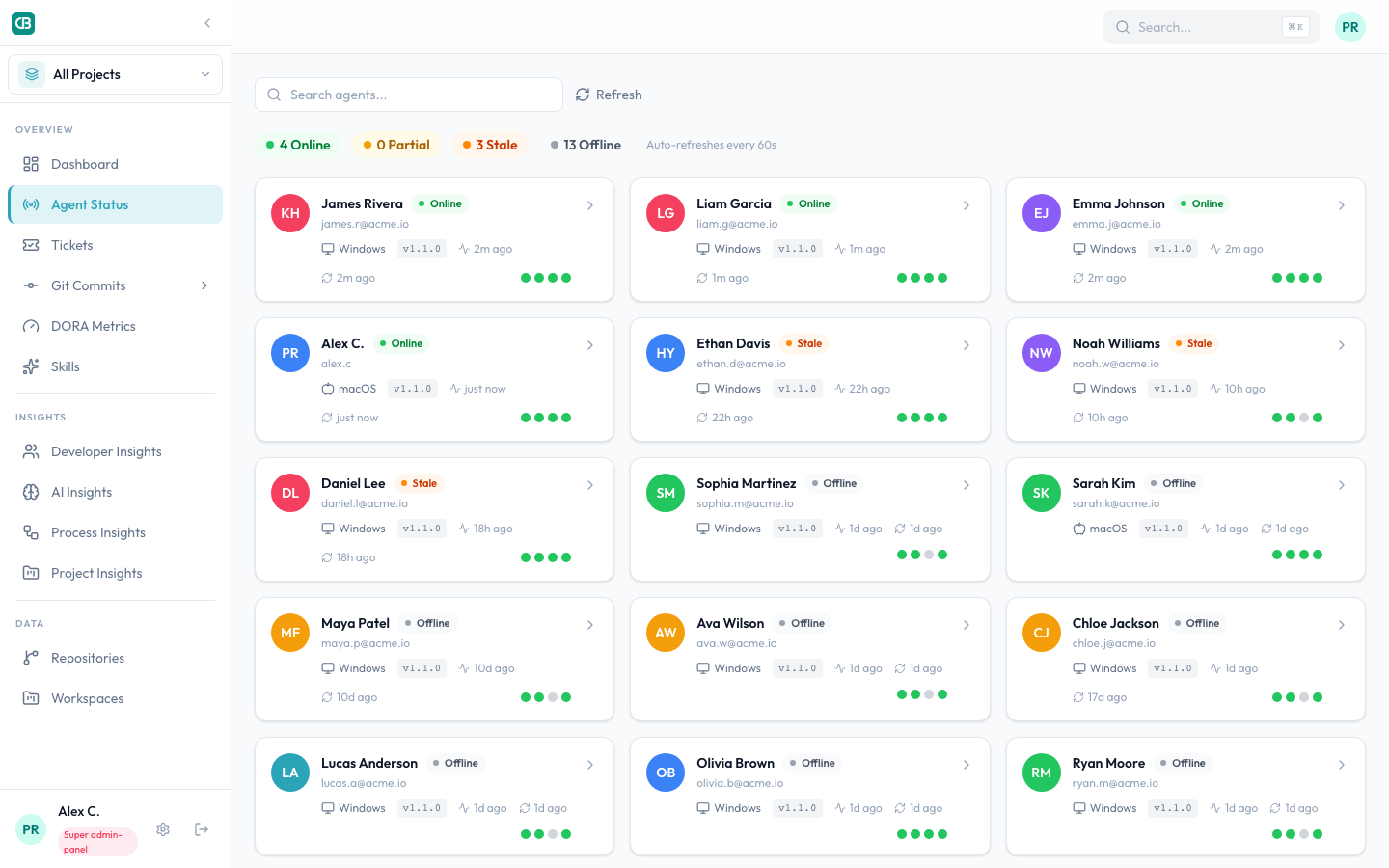
For continuous monitoring rather than a one-time audit, you need a sync agent that posts a heartbeat on each session start, the approach we built into CloudByte PMS.
The general five-step audit (works for any AI tool)
Step 1: Pull the full seat list. Export everyone provisioned from your admin panel. GitHub Copilot: Organisation Settings → Copilot → Seats. Anthropic: platform.claude.com → Team. Export to a spreadsheet.
Step 2: Identify zero-activity accounts. Filter for seats with null last-activity or 0 token/session counts.
Step 3: Cross-reference with calendar. Remove developers who just joined, were on leave, or were only recently provisioned. Focus on accounts provisioned 30+ days ago with zero activity.
Step 4: Reach out before revoking. A short message, such as "Hey, I noticed your AI tool access hasn't been activated yet; want 30 minutes to finish setup, or is this not the right time?", resolves most cases within 24 hours. Developers who don't want the tool will say so.
Step 5: Revoke or re-activate. For confirmed non-users, revoke the seat. For developers who stalled on setup, book a pairing session to finish installation. In our experience, 3 of 7 ghost seats converted to active users this way.
GitHub Copilot note: GitHub exposes inactive seat counts at the organisation level, but not individual session depth or project context. You can see that a seat is unused; you cannot see why, or that it has been unused for eight weeks because setup stalled on day three.
How do you reclaim a ghost seat without losing the licence?
The key distinction: revoke ≠ cancel. On most enterprise AI tool plans, revoking a seat removes access for that developer but keeps the licence in your pool for reallocation. You are not paying for a cancelled seat, and you do not lose the capacity.
| Action | What happens | When to use |
|---|---|---|
| Revoke + reallocate | Licence stays in pool, reassigned immediately | Developer confirmed not using tool |
| Revoke + hold | Licence returns to unallocated pool | No immediate replacement in mind |
| Downgrade tier | Move to lower-cost plan | Developer uses tool occasionally but lightly |
| Re-activate | Keep seat, finish setup with developer | Setup stalled; developer wants to use it |
Steps to reclaim:
- Confirm with the developer they are not planning to use the tool (always ask, never assume)
- In your admin panel, revoke the seat (Copilot: Organisation Settings → Copilot → Revoke seat; Anthropic: platform.claude.com → Team → Remove member)
- Note the reclaimed seat in your licence tracker
- Re-allocate to a new developer or hold it for the next hire
- Set a 30-day check-in cadence: any developer who goes 30 days without a session gets a flag
Automate the 30-day check: CloudByte PMS flags "initiated" and "offline" developer seats in real time: you see ghost seats within days of provisioning, not at renewal. Book a demo to see it on a live team.
GitHub Copilot vs Claude Code vs Cursor: ghost seat visibility compared
Choosing the right audit approach depends on how much visibility your vendor exposes natively.
| Capability | GitHub Copilot | Claude Code (Anthropic) | Cursor | CloudByte PMS (any tool) |
|---|---|---|---|---|
| Per-seat last-activity date | ✅ Via REST API | ⚠️ Usage dashboard only | ❌ No native export | ✅ Real-time |
| Zero-activity alert | ❌ No alert | ❌ No alert | ❌ No alert | ✅ Automatic flag |
| Session depth (prompts/session) | ❌ No | ❌ No | ❌ No | ✅ Full |
| Ghost seat reason diagnosis | ❌ No | ❌ No | ❌ No | ✅ Setup vs. fatigue vs. mismatch |
| 30-day trending | ⚠️ Manual export | ⚠️ Manual export | ❌ No | ✅ Continuous |
| Seat reallocation workflow | ✅ Via admin panel | ✅ Via admin panel | ✅ Via admin panel | ✅ Dashboard + API |
The pattern: every vendor gives you enough to detect a ghost seat manually, but none give you automated alerts, trend monitoring, or root-cause diagnosis. That is the gap an observability layer fills.
What we did with our ghost seats: the results
Once we had the list, we ran five conversations in one week:
- Developers 1–3 (setup stalled): 30-minute pairing session each. Two had a PATH conflict with an existing Node version; one had a corporate proxy config needing one line in
.env. All three activated within 48 hours - Developers 4–5 (tool fatigue): Honest conversations. Both chose not to continue. Seats revoked and held for reallocation
- Developer 6 (workflow mismatch): Seat flagged for Q3 review when they move from infrastructure to a feature team
- Developer 7 (forgot): Set up same day. In top quartile of usage within two weeks
Net result from the audit: 3 re-activated, 2 seats revoked, 2 held for monitoring. Monthly saving: $80 from revocations plus $60 from downgrading three "occasional" seats ($140/month, $1,680/year), and a clean licence audit to present at renewal.
More importantly: we now know which seats are producing output. See also how AI adoption tracking works across our full team rollout.
FAQ: Ghost seats in AI coding licences
What is a ghost seat in AI coding tools?
A ghost seat is a paid AI tool licence assigned to a developer who has never run a session, or who ran one session and stopped. The seat is provisioned, billed, and dormant. It is distinct from a low-usage seat, where the developer uses the tool occasionally but genuinely.
How common are ghost seats?
Based on our Claude Code deployment data, 24% of seats were ghost seats after 30 days. Industry-wide estimates for enterprise software broadly put unused licence rates at 20–30%. AI coding tools are not an exception.
How do I find ghost seats in GitHub Copilot?
Use GET /orgs/{org}/copilot/billing/seats via the GitHub REST API. Any seat with last_activity_at: null has never been used. For seats that have gone inactive, compare last_activity_at against your 30-day threshold.
Can I reclaim a ghost seat without losing the licence?
Yes. Most enterprise AI tool plans let you revoke a seat and return it to your unallocated pool for reallocation. You do not lose the capacity; you reassign it to a new developer. Check your vendor's admin console for a "reassign" or "transfer seat" option.
How long before a dormant seat is officially a ghost seat?
Flag any seat with zero activity after 30 days of provisioning. That is long enough for genuine onboarding delays, but short enough to act before the next billing cycle. Set an automated alert at day 14 to give yourself a two-week intervention window.
What causes ghost seats in AI coding rollouts?
The four main causes: (1) onboarding friction (setup stalled and never resolved), (2) tool fatigue (developer prefers their existing workflow), (3) workflow mismatch (the tool does not suit their project type), (4) simple forgetting during a high-pressure sprint. Cause 1 is the most common and the most fixable.
Does CloudByte PMS detect ghost seats automatically?
Yes. CloudByte PMS tracks a heartbeat per developer seat. Any seat in "Initiated" status (provisioned but zero sessions) is flagged on the agent health dashboard continuously. You see ghost seats within days, not at renewal.