GitHub Copilot vs Claude Code — 30-day data
Every "Copilot vs Claude Code" article you've read was written by someone who didn't measure anything.
They compared feature lists, ran a few prompts in a demo, and declared a winner. What none of them did was deploy both tools to a real engineering team and look at what the output data actually said.
We did.
For 30 days, we ran a structured comparison across our 22-developer engineering team: 11 developers on GitHub Copilot, 11 on Claude Code, same codebases, same sprints, measured with our own activity tracking layer. This post is the data.
Transparency note: This is our team's data from a single organisation. Your results will depend on what you build, how your developers work, and which features of each tool you actually use. We're not making claims about either product universally; we're showing what we measured on our specific team and project mix.
How we set up the comparison
Team split: We divided our 22 active developers into two matched cohorts of 11. Matched by seniority (same ratio of senior, mid, junior), by project assignment (both cohorts had backend, frontend, and infra representation), and by prior AI tool experience (minimal for both groups; this was most developers' first structured AI coding rollout).
Duration: 4 weeks, tracked continuously. Week 1 was onboarding and setup. Weeks 2–4 were the measurement period.
What we measured:
- Sessions per developer per week
- Prompts per session (session depth)
- Commits per developer per week
- Average commit size (lines changed)
- PR cycle time (open to merge)
- Productivity multiplier by work type (AI-assisted vs. baseline output)
What we did not measure: Subjective preference, survey scores, or "satisfaction." Interesting, but not what an EM needs to justify spend.
The results: headline numbers
| Metric | GitHub Copilot | Claude Code | Difference |
|---|---|---|---|
| Avg sessions/developer/week | 18.2 | 24.7 | Claude Code +36% |
| Avg prompts per session | 3.1 | 7.4 | Claude Code +139% |
| Commits/developer/week | 22.4 | 28.1 | Claude Code +25% |
| Avg commit size (lines) | 210 | 156 | Copilot +35% larger |
| PR cycle time | 2.8 days | 2.1 days | Claude Code −25% |
| Team-wide productivity multiplier | 1.4× | 1.8× | Claude Code +29% |
The multiplier range matters more than the average. Both tools have work types where they shine and work types where they don't help. The averages above hide significant variation by project type. See the breakdown below.
The 1.8× vs 1.4× gap is real but it's not the right conclusion to take from this data. The more interesting story is where each tool wins, and the answer is not "Claude Code everywhere."
Results by work type
This is where the comparison gets useful.
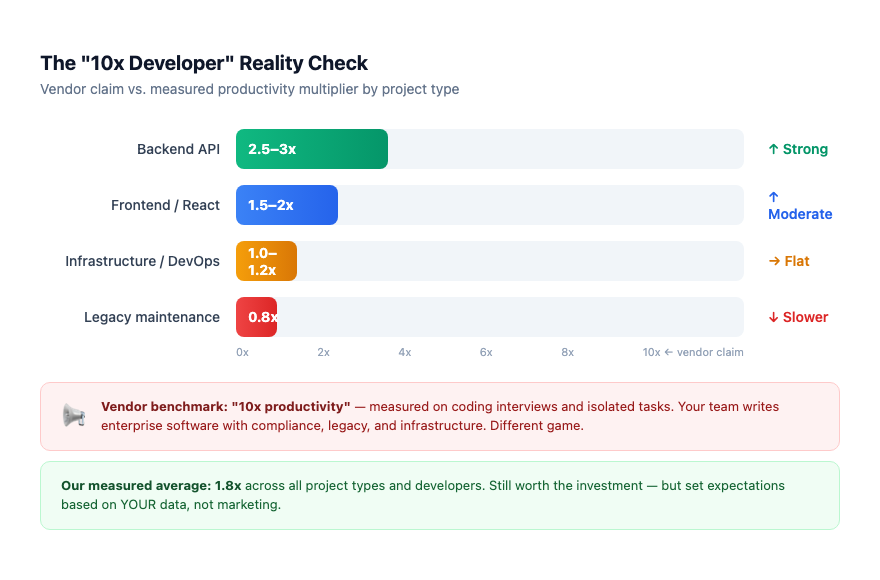
Backend API development
Claude Code: 2.8× | Copilot: 1.4×
Claude Code's advantage was largest on backend API work: CRUD endpoints, data models, business logic with multiple dependencies. The reason is session depth: Claude Code handles multi-step tasks in a single conversation. "Create a REST endpoint, add input validation, write the tests, and update the OpenAPI spec" runs as one coherent thread. Copilot's inline completion model meant developers issued four separate requests and stitched the results together.
For senior backend developers, the difference was dramatic. For junior developers, Copilot's lower ceiling was sometimes an advantage: fewer decisions to make, more predictable output.
Frontend React / TypeScript
Claude Code: 1.9× | Copilot: 1.6×
Closer than backend. Copilot's IDE integration gives it a natural advantage in component-heavy work: inline suggestions inside JSX are faster than switching to a conversation thread. Claude Code won on the complex cases: state management refactors, converting class components, accessibility audits across multiple files. Copilot won on routine component scaffolding.
Neither tool was dominant. If your team writes a lot of React, the difference doesn't justify a switch. If your team writes a mix, the gap in complex work is worth knowing.
Infrastructure / DevOps (Terraform, Kubernetes, CI/CD)
Copilot: 1.2× | Claude Code: 1.0×
Copilot's edge in infrastructure work was the inline experience. Terraform and YAML have rigid syntax that Copilot's trained-on-patterns approach handles well. Claude Code often produced structurally valid but context-mismatched configs. It would write a valid Kubernetes deployment manifest that didn't match our naming conventions or reference our actual service names. Copilot's completions were better calibrated to the existing patterns in the file.
Claude Code at 1.0× is not a knock; it's parity with unassisted work, which is better than the 0.8× we saw on legacy infrastructure. But for infra-heavy teams, Copilot is the clearer choice.
Legacy code maintenance
Copilot: 0.9× | Claude Code: 0.8×
Both tools got worse than the developers working unaided on legacy code. No surprise: undocumented edge cases, tribal knowledge baked into variable names, code written 8 years ago in a framework neither tool has strong training data on. AI suggestions required more correction than they saved.
This isn't a knock on either tool. It's a calibration: if you evaluate AI coding tools primarily on your legacy codebases, you will conclude they don't work. They don't work there. They work elsewhere.
Where Copilot wins
1. Inline suggestion speed. Copilot lives in the IDE. There is no context switch. The suggestion appears as you type. For developers with strong code instincts who want to stay in flow, Copilot's interaction model is faster than switching to a chat thread.
2. Infrastructure and config-heavy work. As shown above, pattern-matching on existing file context is Copilot's strength.
3. Lower learning curve. Copilot's interaction model is tab-to-accept. No prompting discipline needed. For teams who haven't invested in AI workflow training, onboarding is faster.
4. IDE ecosystem depth. JetBrains, VS Code, Visual Studio, Neovim: Copilot is deeply integrated. Claude Code is primarily a terminal-based tool. For developers who live in JetBrains IDEs, Copilot's tooling advantage is real.
Where Claude Code wins
1. Complex, multi-step tasks. Claude Code handles tasks that require coordinating multiple files, generating and running tests, updating related documentation, and explaining tradeoffs, all in a single conversation. Copilot's model is line-by-line; Claude Code's model is task-level.
2. Session depth. Our data shows Claude Code users ran an average of 7.4 prompts per session vs. Copilot's 3.1. This reflects a fundamental difference in how developers use the tools: Copilot for single completions, Claude Code for extended work sessions.
3. Understanding the codebase, not just the file. Claude Code can be given context about the whole project (architecture, conventions, related files), and it uses that context across the session. Copilot's context is limited to open files.
4. Written output quality. Commit messages, PR descriptions, technical documentation: Claude Code's output on text tasks is noticeably better, and the data backs this up (our AI commit summary post covers this in detail).
The question most comparison posts don't ask
Neither tool tells you whether it's working.
GitHub Copilot's analytics (available in enterprise plans) gives you seat-level active/inactive counts and some aggregate completion data. It doesn't tell you which projects benefit, which developers are using it productively vs. superficially, or whether the output has changed since week 1.
Claude Code has no built-in team analytics at all.
This matters more than the comparison table. A 1.4× multiplier you can see and manage is worth more than a 1.8× multiplier you can't. We had three developers on the Copilot cohort whose sync health showed as stale for 10 days (broken setup, no sessions, effectively zero ROI), and we caught it because we had monitoring. Without that, those seats would have looked "active" in the vendor dashboard but been generating nothing.
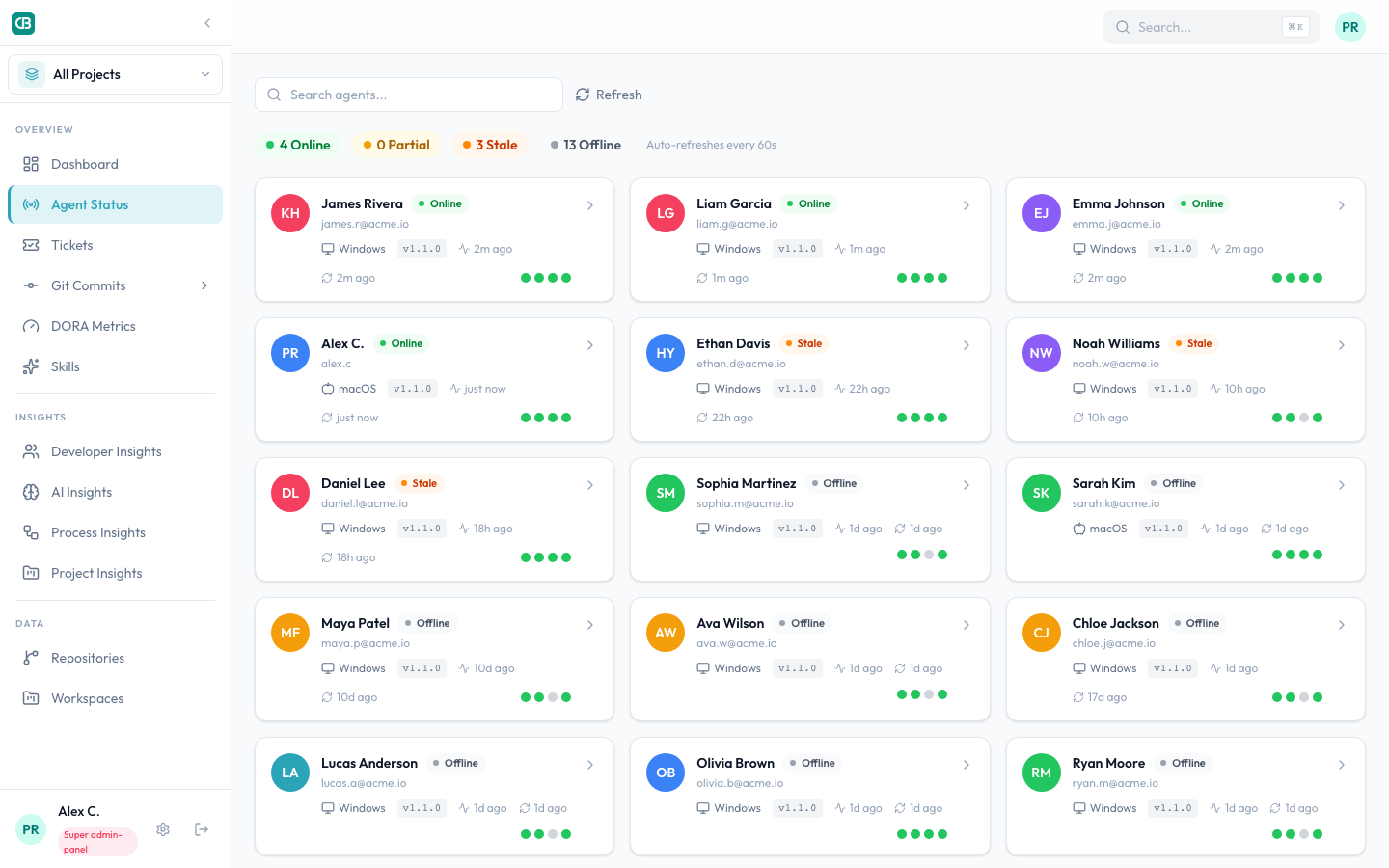
The visibility layer is what turns a 1.4× or 1.8× headline into actual business impact.
The honest answer: which should you use?
Use Copilot if:
- Your developers are primarily in JetBrains or VS Code and want to stay there
- Your team is infra-heavy or config-heavy
- You're on GitHub Enterprise and want native integration
- You want the lowest-friction adoption for developers who aren't keen on AI tools
Use Claude Code if:
- Your team does significant backend API or full-stack feature work
- You want session-level context and multi-file reasoning
- You have developers who will invest in prompt discipline
- You're willing to add a measurement layer to know whether it's working
Use both if:
- You have genuinely mixed teams: some infra-heavy, some feature-heavy
- You want to run your own comparison before committing to one
- You don't want vendor lock-in on your AI toolchain
The real answer for most engineering organisations is: the tool matters less than the measurement. A team running Copilot with activity tracking and adoption monitoring will outperform a team running Claude Code with no visibility into who's actually using it.
Want to run this comparison on your own team? CloudByte PMS gives you the measurement layer (sessions, prompts, commit attribution, health monitoring) regardless of which AI tool your developers use. Book a demo and we'll show you what the dashboard looks like on real team data.
Related reading
- We tracked every AI coding session for 30 days, the full data post this comparison builds on
- What 4 weeks of AI-assisted coding did to sprint velocity, delivery outcomes: velocity, bug rate, PR cycle time
- 24% of our AI licences were never activated, what happens when you don't monitor adoption
- GitHub Copilot vs CloudByte PMS, feature-by-feature comparison of the tools themselves