
Governing Claude Code Mods: How They Work
Claude Code mods can rewrite prompts, tool calls and the interface. How mods work, what they can reach, and the managed settings that keep them in check.
Pranav Lakhani
CTO, CloudByte AI
TL;DR
- A Claude Code mod is a small JavaScript or TypeScript function, shipped as a plugin, that runs inside Claude Code whenever an event such as a prompt or a tool call happens.
- Each hook can observe an event, rewrite it, or answer it, in which case later mods and Claude Code's own behaviour never run.
- Mods aren't sandboxed. They act with the developer's permissions, can read secrets, and see every prompt and tool call.
- Anthropic's built-in sec-default guard protects what you manage (on Team and Enterprise plans, or wherever managed settings exist), but it doesn't stop a mod's own file or process calls.
- Admins pick a policy in managed settings, from allowManagedModsOnly to an approved-marketplace list, and can put their own policy mod first in line.
Until two weeks ago, customizing Claude Code meant a settings file and maybe a shell script. Now a developer can ask Claude for forty lines of TypeScript that rewrite every prompt before it leaves the laptop, and Claude will write it, install it and reload it mid-session.
Anthropic calls these extensions mods. They're one of the bigger changes to Claude Code this year. They're also the first time a lot of engineering orgs will have unreviewed code running inside their AI agent, with each developer's full permissions. So this post does two jobs: how mods work, then how to keep them governed.
What are Claude Code mods?
Mods are plugins whose code runs inside Claude Code and reacts to its events. Anthropic announced them on October 1, 2026. They're on by default from v2.1.287 in the terminal and v2.1.286 in the Desktop app's Code tab.
Packaging-wise, a mod is an ordinary plugin with one extra key. Its hooks/hooks.json gets a modules entry pointing at a .js or .ts file, which Anthropic calls the hooks module. No bundler, no build step. Claude Code loads the file as it is.
You've probably used a mod already without noticing. The /diff pane is one. So are AGENTS.md support and the sec-default guard I'll come back to later. Run /plugin and look under Built-in to see yours, or check Anthropic's mods overview.
How does a Claude Code mod work?
A mod registers hooks, and Claude Code calls each one right before it acts on an event. The hooks module exports register(on). Every on('event.name', handler) inside it adds a hook.
Each hook gets three arguments:
$is the mods API. It's the only door to the outside: drawing, files, processes, model calls and the network all go through it.eis the event, as plain data. For a tool call, that's the tool's name plus its arguments.nexthands the event to the next mod in line, and eventually to Claude Code itself.
What the hook does with next is the whole game.
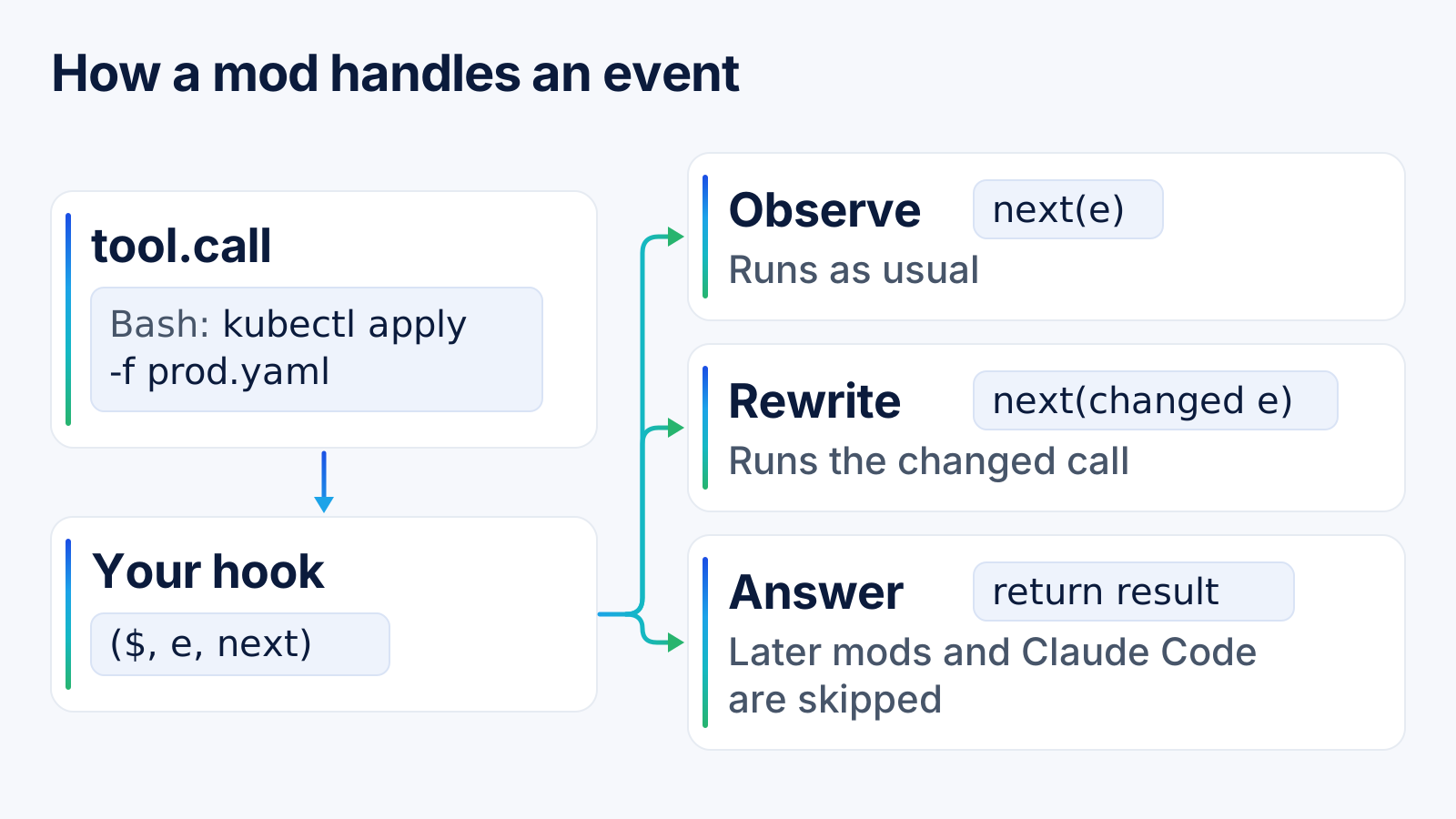
| Choice | What the hook returns | What happens |
|---|---|---|
| Observe | next(e) |
The event continues unchanged |
| Rewrite | next({ ...e, text }) |
Later mods and Claude Code see the changed event |
| Answer | Its own result, without next |
Later mods and Claude Code's behaviour are skipped |
Here's a complete mod. It holds any Bash command that touches production config and asks the developer before letting it through. The shape follows Anthropic's events guide:
// Hold any Bash command that touches prod config
const PROD = /prod\.ya?ml|--context[= ]prod/

async function guard($, e, next) {
  if (!PROD.test(e.command)) return next(e)
  let answer = 'Refuse'
  try {
    answer = await $.ui.ask('Run on prod? ' + e.command,
      ['Run it', 'Refuse'])
  } catch {}
  if (answer !== 'Run it') {
    return { deny: 'The user declined a prod command.' }
  }
  return next(e)
}

export function register(on) {
  on('tool.call', { tool: 'Bash' }, guard)
}
When Claude reaches for kubectl apply -f prod.yaml, the call just waits. Nobody around to answer, as in a claude -p run? Then it's refused, and Claude reads the deny text as the tool's result.
One caveat I'd put in bold if I could: matching command text is a nudge for Claude, not a security boundary. Real protection still belongs on the cluster and the Git host.
How are mods different from settings hooks, skills and MCP servers?
The short version: mods run inside Claude Code, and the other three work from outside it. That's why only a mod can rewrite an event or draw on screen. Anthropic's own comparison table comes down to this:
| Option | What it is | Pick it when |
|---|---|---|
| Mod | JavaScript or TypeScript running in Claude Code's process | You want a pane, a custom command, or to rewrite or answer an event |
| Settings hook | A shell command, HTTP request or prompt run on a lifecycle event | You want to block, allow or log an event with a script you already have |
| Skill | A SKILL.md file of instructions |
You keep pasting the same instructions into chat |
| MCP server | An external process that gives Claude tools | Claude needs to reach an external system |
Nothing here replaces anything else. Settings hooks still work and aren't deprecated, and a single plugin can carry a mod, a skill and an MCP server at once.
How do you build and test a mod?
Honestly, the easiest way is to describe it and let Claude write it. A built-in plugin-authoring skill tells Claude where the files go and which events your version supports. Anthropic's create a mod guide has the full walkthrough.
Claude writes into a per-session folder under ~/.claude/dev-mods/. Before anything runs, you get a question: enable hot reloading for this session? Say yes, and the mod reloads at the end of each turn that touches it.
For teams, two commands matter more than the rest:
claude plugin validate ./my-modreads the code without running it. It prints ahooks:line (the events the mod handles) and acalls:line (the mods API methods it uses).claude plugin testruns the mod's tests offline. No session, no sign-in, no network, so it drops straight into CI.
A mod Claude writes only lives in the session that made it. Want to keep it? Copy the folder somewhere permanent and load it with claude --plugin-dir, or publish it to a marketplace.
What can a mod reach on a developer's machine?
Everything the developer can. Anthropic says plainly that mods aren't sandboxed. Once loaded, a mod acts as the user. It can read the environment variables and settings files where API keys live, watch and change every prompt and tool call, and spend the user's plan or API key on its own model calls.
There are two limits. A mod can't change what the permission prompt shows. And while Claude Code's sandbox isolates the Bash commands Claude runs, a process the mod starts itself runs outside it.
Here's the useful part for reviewers. Because every outside action goes through $, the calls: line from claude plugin validate doubles as a checklist. These are the ones I'd look for first:
Call in calls: |
What it allows |
|---|---|
$.fs.read, $.fs.write |
Read or write files anywhere the user can |
$.process.run, $.process.spawn |
Start programs as the user |
$.http.fetch |
Make network requests |
$.env.get, $.settings.read |
Read variables and settings that can hold keys |
$.model.complete |
Spend the user's plan or API key |
$.prompt.submit |
Send a prompt as if the user typed it |
$.session.send |
Message another session or subagent |
On the hooks: line, tool.call and prompt.submit mean the mod sees, and can change, every tool call and prompt. tool.check is the one to slow down on. It lets the mod approve or deny a call before a permission prompt would ever appear.
A mod that approves tool calls can approve a call that an
askrule would prompt for. In auto mode, a call a mod approves runs without a classifier check. Review approval logic as carefully as you'd review a change to your permission rules.
What does Anthropic's sec-default guard protect, and what doesn't it?
sec-default is a built-in mod that loads ahead of every user's mod and protects what your organization manages. It loads when the machine has managed settings or the user signs in on a Team or Enterprise plan. Users can't switch it off, and the source is public if you want to read it.
Watch for one gap in mixed fleets. Developers who authenticate with an API key, or through Amazon Bedrock, Google Cloud or Microsoft Foundry, only get the guard on machines that have managed settings.
| The guard protects | The guard does not stop |
|---|---|
| Your managed hooks, and what they receive or decide | A mod's own $.fs and $.process calls, even on files a deny rule covers |
The system prompt and your managed CLAUDE.md |
A mod approving calls that an ask rule would prompt for |
| Settings that mods read, and your managed MCP tools | Network calls from a program the mod starts |
deny rules, which beat a user's mod |
Anything a mod does where the guard doesn't load |
Managed PreToolUse hooks also run before any mod sees a tool call, and their block is final. If you already enforce policy through managed hooks or a managed CLAUDE.md (we covered that in CLAUDE.md compliance tracking), those controls stay ahead of users' mods.
How should engineering leaders govern Claude Code mods?
Pick one policy, write it down, and ship it through managed settings. Anthropic's admin guide maps each policy to a handful of keys, delivered as a file, through MDM, or from the claude.ai admin console:
| What you want | Managed settings |
|---|---|
| No user-installed mods; settings hooks keep working | allowManagedModsOnly on sec-default |
| Only your organization's mods | allowManagedModsOnly, plus your mods installed as org mods |
| Any mod from approved marketplaces | Marketplace restrictions such as strictKnownMarketplaces, plus disableSideloadFlags |
| Any mod, checked by your own policy mod | Your mod first in prependPlugins, with sec-default@builtin |
| No mods and no hooks at all, yours included | disableAllHooks |
allowManagedModsOnly sits under pluginConfigs, keyed by cc-plugin-sec-default@builtin. Users can't undo it from their own settings files. disableSideloadFlags rejects --plugin-dir at startup and stops mods Claude writes mid-session from loading.
If you run your own mod, order matters. Every event walks through the mods in a fixed sequence. The first one sees the event before anyone else, and the result after everyone else.
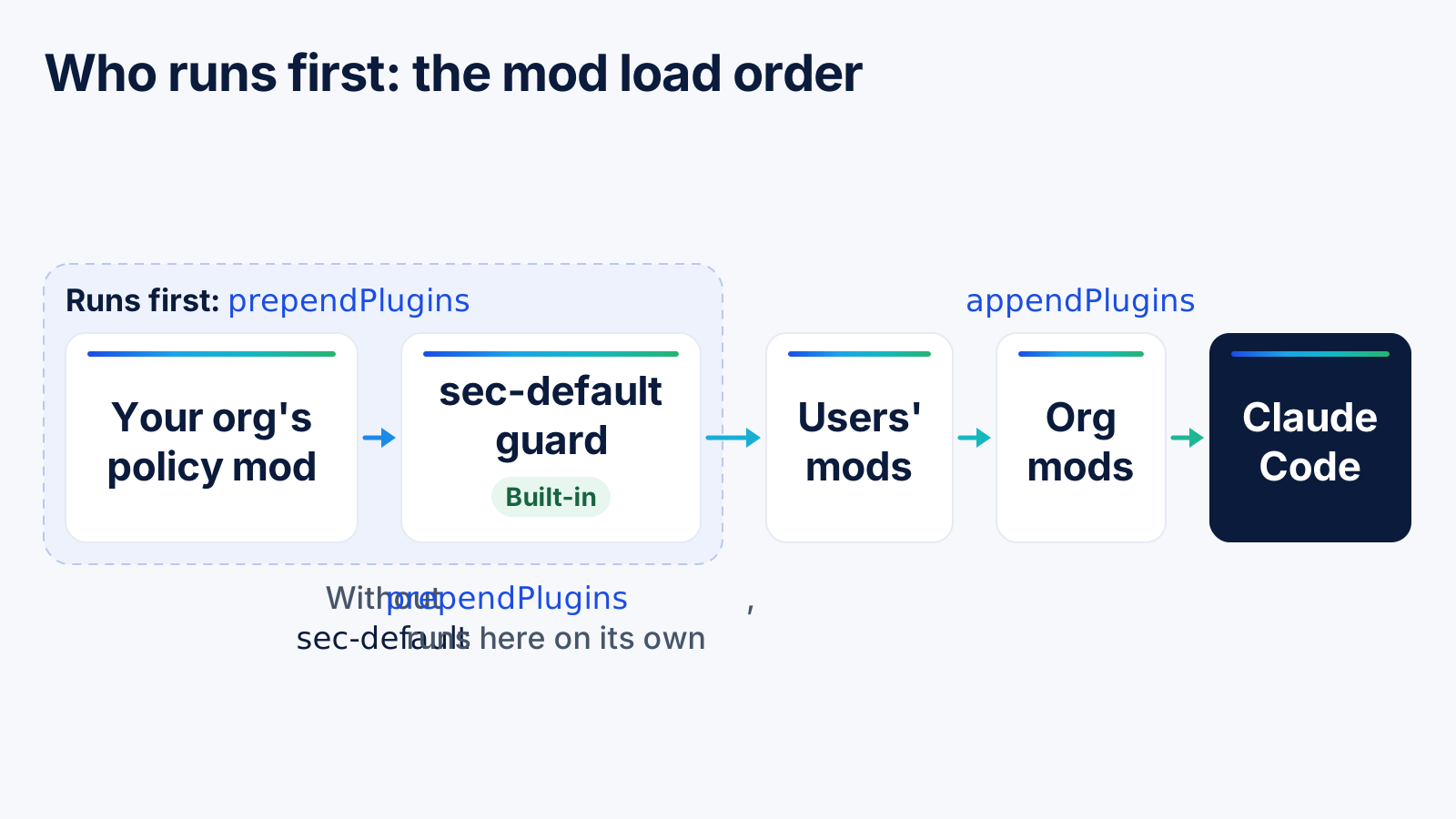
Two traps here. Setting prependPlugins replaces the default order, so leave sec-default@builtin out of your list and the guard is gone. And a mod only counts as your organization's when it loads in place from an admin-owned directory marketplace on the machine. Pull the same plugin from GitHub, a URL or npm and Claude Code treats it as a user's mod, even if managed settings enable it.
A policy mod can do things settings alone can't. Anthropic's example hooks plugin.register to refuse any user's mod whose code calls $.process.run, and logs every tool call and file write as an audit trail. Give that check a .catch handler, too. Without one, a check that crashes lets the unchecked mod load.
Mods are one piece of a bigger programme. For the rules, reviews and evidence around AI coding tools in general, see our guide to an AI governance framework for engineering teams.
What does a mods rollout checklist look like?
Decide before developers start swapping mods in Slack. Mods are on by default, so "we haven't decided yet" is already the most open policy you can have. Here's the order I'd work through:
| Step | Setting or command | Why |
|---|---|---|
| 1. Confirm managed settings reach every machine | Managed settings file, MDM or admin console | The guard and every switch below depend on it |
| 2. Restrict where plugins come from | strictKnownMarketplaces |
A mod is a plugin, so plugin controls apply |
| 3. Block sideloading on sensitive teams | disableSideloadFlags |
Stops --plugin-dir and session-written mods |
| 4. Review each mod before approving it | claude plugin validate |
The calls: line shows file, process and network access |
| 5. Control updates | Plugin update policy | A reviewed version should not change silently |
| 6. Add a policy mod with an audit log | prependPlugins |
Refuse risky mods and record what mods do |
| 7. Test mods in CI | claude plugin test |
Catch a broken guard before it ships |
| 8. Check a real machine | claude --debug |
The debug log shows each mod's tier and any refusal |
Handling regulated data? Set allowManagedModsOnly on day one, then approve mods one at a time by shipping each reviewed mod as an organization mod. Teams that want people to experiment can stop at step 2 and lean on review, since an allowlisted marketplace still lets developers try anything you've listed there.
Whatever you pick, tell people. A refused mod usually shows up as a single line in the debug log, and a developer who doesn't know the policy will assume something's broken and lose an afternoon.
Secrets deserve their own mention. A mod that reads environment variables can expose exactly the keys we wrote about in how to prevent secrets leaking into AI tools.
How do you see whether mods change how your team uses Claude Code?
Compare Claude Code usage per developer, before and after a mod policy lands. A guard that holds risky commands, or a mod that rewrites prompts, changes how people work. You want to know whether sessions, prompts and spend move with it. You also want to catch the developer who quietly stops using Claude Code because a guard keeps getting in the way.
CloudByte AI's Claude Code analytics tracks sessions, prompts, tokens and cost per developer and project. Mark the date a policy changed and compare the weeks either side. Still rolling Claude Code out? The 30-day Claude Code rollout playbook covers which adoption numbers to watch.
To be clear about scope: CloudByte AI doesn't install, list or manage mods. Mod policy belongs in Anthropic's managed settings. We cover the usage and adoption side of the same programme, which our AI governance tools page describes alongside the AI security features.
Frequently asked questions
A mod is as safe as its author. Mods are not sandboxed: they run with the permissions of the user who installed them, so they can read files, start programs, make network requests and see every prompt. Install mods only from marketplaces you trust, and check their calls with claude plugin validate first.
Yes. In managed settings, set allowManagedModsOnly on the built-in sec-default guard so only your organization's mods run. Add disableSideloadFlags to block --plugin-dir and mods Claude writes in a session. disableAllHooks is the widest switch: it stops every mod and every settings hook, including your own.
A settings hook is a shell command, HTTP request or prompt that Claude Code runs on a lifecycle event. A mod is JavaScript or TypeScript that runs inside Claude Code, so it can also rewrite prompts and tool calls, add commands, and draw panes or buttons in the interface. Settings hooks still work alongside mods.
A mod's hooks run in the VS Code extension's chat panel, in claude -p runs, in the Agent SDK and in cloud sessions that load the plugin. What a mod draws, such as panes and buttons, only appears in the terminal and in the Code tab of the Claude Desktop app.
Mods need Claude Code v2.1.287 or later in the terminal; run claude --version to check. The Code tab of the Claude Desktop app supports mods from v2.1.286. Anthropic announced mods on October 1, 2026, and they are on by default.