Olakai alternative for engineering teams
Olakai is a smart tool. It is just not built for you.
If you are an engineering manager tracking which developers are actually using Claude Code, whether agentic sessions are producing shipped work, and which of your twenty-five developer seats are idle — Olakai was not designed for that question. It was designed for the CFO three floors up who needs to know whether the company's $2M annual AI software portfolio is correctly allocated across departments.
That distinction matters when you are evaluating AI analytics tools. The wrong tool gives you data — just not the data you can act on.
What is Olakai and who is it actually built for?
Olakai is an AI spend optimization platform designed for enterprise finance buyers — CFOs, procurement leads, and IT operations teams — managing $400K+ in annual AI software licenses across multiple vendors and departments.
Olakai's core capability is aggregating spend across enterprise AI vendors (Microsoft Copilot, Salesforce AI, ServiceNow AI, Workday AI, GitHub Copilot) and surfacing license utilization at the department level. The typical Olakai use case: a company spending $2M/year on AI software licenses across fourteen departments wants to know which departments are under-utilizing their allocation and whether the contract can be renegotiated at renewal.
That is a legitimate problem. It is not the problem most engineering managers are trying to solve.
What Olakai does well:
- Cross-vendor spend aggregation (coding tools, productivity suites, CRM AI, ERP AI)
- Department-level utilization vs license allocation
- Contract renewal optimization for enterprise agreements
- CFO-facing dashboards with budget variance reporting
What Olakai does not provide:
- Developer-level session data for Claude Code or other AI coding tools
- Per-PR agentic cost tracking with four Anthropic token types
- Ghost seat detection at the individual developer level
- Git output correlation (did this developer's AI sessions produce merged PRs?)
- Engineering-manager-native dashboards with team velocity context
What does a mid-market engineering team actually need from AI analytics?
Engineering teams of 10–200 developers need per-developer session visibility, agentic cost attribution per PR, and ghost seat detection — three capabilities that Olakai's enterprise finance design does not prioritize.
The questions engineering managers ask are structurally different from the questions CFOs ask:
| EM question | CFO question |
|---|---|
| Which developers are using Claude Code daily? | How much are we spending on AI software this quarter? |
| Which sessions produced merged PRs? | Which departments are under-utilizing their AI licenses? |
| Is this $3 agentic session producing the output it costs? | Should we renew the GitHub Copilot enterprise agreement? |
| Are 6 of my 25 developer seats idle right now? | Are we above or below budget vs the AI software line? |
| Does Claude Code usage correlate with faster sprint velocity? | What is the blended ROI on our AI software portfolio? |
Tools built for the CFO question struggle to answer the EM question — not because they are bad tools, but because they aggregate data at the wrong granularity. You cannot see which developer is the ghost seat when the dashboard shows "Team Engineering: 73% utilization."
Why does developer-level granularity matter for AI analytics?
A 27% idle seat rate looks like a procurement optimization problem from the finance dashboard. From the engineering manager dashboard, it looks like six specific people who either did not complete onboarding, are on a project where Claude Code is not relevant, or are waiting for BYOK approval.
Those six situations require six different interventions. You cannot see which one applies from a department-level utilization rate.
How does CloudByte PMS compare to Olakai?
CloudByte PMS is purpose-built for engineering managers — it tracks developer-level Claude Code sessions, agentic PR costs, and ghost seat detection without enterprise contracts or multi-month implementation timelines.
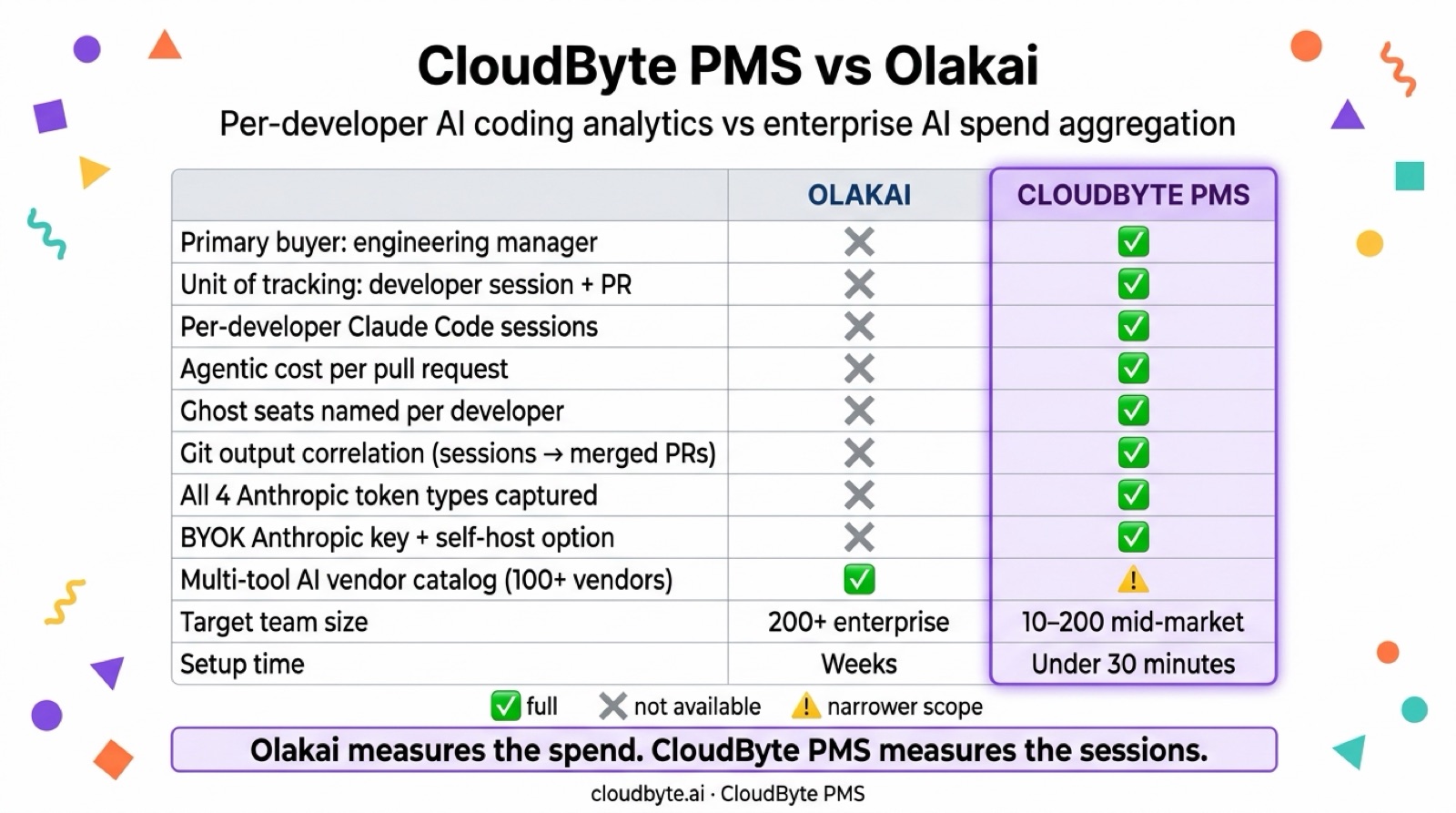
The functional difference between CloudByte PMS and Olakai is the unit of analysis: CloudByte tracks at the developer + session + PR level; Olakai tracks at the vendor + department + contract level.
| Feature | CloudByte PMS | Olakai |
|---|---|---|
| Primary buyer | Engineering manager / VP Eng | CFO / IT procurement |
| Unit of tracking | Developer session + PR | Department license + vendor |
| Claude Code native tracking | ✅ Session-level, all 4 token types | ❌ Aggregate spend only |
| Agentic cost per PR | ✅ Per-session attribution | ❌ Not supported |
| Ghost seat detection | ✅ Per developer | ⚠️ Department-level utilization |
| Git output correlation | ✅ Sessions → merged PRs | ❌ No git integration |
| Multi-tool normalization | ✅ Claude, Copilot, Gemini | ✅ 100+ enterprise AI vendors |
| BYOK / self-host | ✅ Anthropic BYOK + AWS self-host | ❌ Enterprise contracts only |
| Target team size | 10–200 developers | 200+ (enterprise) |
| Setup time | Under 30 minutes | Weeks (enterprise procurement) |
| Pricing start | Free up to 5 seats | Enterprise contract |
Note on Olakai's multi-vendor strength. If your team uses AI coding tools alongside Microsoft Copilot for Office, Salesforce AI, or similar enterprise software AI features, Olakai's 100+ vendor catalog is genuinely broader than CloudByte PMS's coding-tool focus. The choice depends on whether your AI spend management question lives in engineering or in finance.
What does CloudByte PMS offer that Olakai doesn't for engineering teams?
CloudByte PMS gives engineering managers four capabilities that Olakai's enterprise design does not support: developer-session tracking, agentic PR cost attribution, individual-level ghost seat detection, and git output correlation.
How does developer-session tracking for Claude Code work?
Olakai's Claude Code data, when available, comes through the Anthropic Analytics API — which provides aggregate token counts per model per day, not per developer or per session. To see which developer ran which agentic session and what it cost, you need a session-level capture layer between the developer and the Anthropic API.
CloudByte PMS captures all four Anthropic token types (input, output, cache_creation_input, cache_read_input) per session, tagged with developer identity and project context. This is the data that tells you whether your $2,400/month in Claude Code sessions is producing 120 merged PRs or 12.
What is agentic cost per PR and why does it matter?
Inline Claude Code suggestions cost a few cents per completion. Agentic sessions — where Claude reads the repo, edits files, runs tests, and fixes failures — cost $0.30–$3.50 per merged PR on Sonnet. The top 10% of agentic sessions by cost account for 45–55% of total agentic spend.
Without per-session attribution, you cannot identify the outlier sessions driving cost. Olakai surfaces monthly spend by vendor — useful at contract renewal, not useful for the engineering manager who needs to flag a $12 agentic session before it becomes a weekly pattern. For a deeper look at agentic cost economics, see how much it actually costs to merge a PR with Claude Code.
How does ghost seat detection differ at the developer level?
Ghost seat detection — identifying which specific developer seats have been inactive for 30+ days — requires per-developer session data. Olakai can surface that 27% of your GitHub Copilot seats are underutilized at the department level. CloudByte PMS surfaces that developers 4, 11, 17, 19, 21, and 24 (by name) have not logged a Claude Code session in 32 days.
The second format produces action: a specific outreach to six specific people, not a ticket to IT asking about department utilization.
Why does git output correlation matter for AI ROI?
The most important AI analytics question is not "how much are we spending?" but "is what we are spending producing output?" Correlating agentic session cost to merged PRs requires both a session cost record and a git record with the same developer identity and timestamp.
CloudByte PMS links session records to merged PRs via branch name and commit author — surfacing a cost-per-PR metric per developer. Olakai does not have a git integration; it tracks spend, not output.
How does CloudByte PMS pricing compare to Olakai?
CloudByte PMS starts free for teams under five developers and costs $15 per seat per month — no enterprise contract, no procurement process, active in under 30 minutes.
Olakai's target market is enterprises with $400K+ AI software spend, which implies enterprise contract pricing. Public pricing is not listed; enterprise software at that spend level typically requires procurement, security review, and multi-month implementation.
| CloudByte PMS | Olakai | |
|---|---|---|
| Free tier | ✅ Up to 5 developers | ❌ |
| Pay-per-seat | $15/seat/month | Enterprise contract |
| Annual billing | $10/seat/month | Custom |
| Self-host | ✅ Enterprise plan | ❌ |
| Minimum commitment | None | Enterprise (typically 12 months) |
| Setup time | Under 30 minutes | Weeks (procurement + implementation) |
For a 20-developer team on the annual plan, CloudByte PMS costs $2,400/year — well under the entry point for most enterprise AI analytics contracts.
When does Olakai make more sense than CloudByte PMS?
Olakai is the better fit when your primary buyer is a CFO or IT procurement team managing cross-department AI software spend at enterprise scale — not an engineering manager tracking developer-level Claude Code usage.
Specific cases where Olakai is the right choice:
-
Your AI spend spans non-coding tools. If you manage Microsoft Copilot for Office, Salesforce AI, ServiceNow AI, and GitHub Copilot under one procurement umbrella, Olakai's 100+ vendor catalog serves the finance team's consolidation need in a way that CloudByte PMS's engineering focus does not.
-
Your buyer is in finance, not engineering. Olakai's dashboards are designed for CFO and procurement reporting. If the person running the AI analytics initiative is VP Finance or Head of IT Procurement, Olakai's output maps directly to their workflow.
-
Your team is 500+ developers in a multi-division enterprise. Olakai's enterprise contract and implementation model is calibrated for large deployments where multi-department coordination is the primary challenge.
If you are an engineering manager, VP Engineering, or CTO at a company with 10–200 developers who primarily use AI coding tools, CloudByte PMS is a more direct fit. You can compare CloudByte PMS to Jellyfish — another enterprise engineering analytics platform — if you are also evaluating that category.
FAQ: Olakai alternative for engineering teams
What is the best Olakai alternative for mid-market engineering teams?
CloudByte PMS is the leading Olakai alternative for engineering teams of 10–200 developers. It provides developer-level Claude Code session tracking, agentic PR cost attribution, ghost seat detection at the individual developer level, and git output correlation — with setup in under 30 minutes and pay-per-seat pricing starting free for teams under five.
What does Olakai do that CloudByte PMS doesn't?
Olakai covers 100+ enterprise AI vendors — Microsoft Copilot for Office, Salesforce AI, ServiceNow, Workday AI, and many others — under a single spend management platform. CloudByte PMS focuses on AI coding tools (Claude Code, GitHub Copilot, Gemini for code). If your AI spend includes non-coding enterprise software AI features managed by IT procurement, Olakai's coverage breadth is a genuine advantage.
How does CloudByte PMS compare to Olakai for ghost seat detection?
CloudByte PMS detects ghost seats at the individual developer level — it tells you which specific developer accounts have been inactive for 30+ days. Olakai detects underutilization at the department level, which helps finance right-size vendor contracts but does not produce the per-developer list that engineering managers need to take action.
Does CloudByte PMS track multiple AI tools like Olakai does?
CloudByte PMS normalizes session data and costs across Claude Code (Anthropic), GitHub Copilot, and other AI coding tools. It is not a multi-department enterprise spend aggregator — it is an engineering-specific analytics platform. If you need to track coding tools plus Microsoft 365 AI and Salesforce AI in one dashboard, Olakai's catalog is broader.
How long does it take to set up CloudByte PMS vs Olakai?
CloudByte PMS is active in under 30 minutes: connect your GitHub org, configure developer seats, and the first session data appears as developers use Claude Code. Olakai requires enterprise procurement, security review, and implementation — typically measured in weeks to months.
What does CloudByte PMS cost vs Olakai?
CloudByte PMS is free for teams up to 5 developers, $15 per seat per month for larger teams ($10 billed annually). Olakai requires an enterprise contract and does not publish pricing publicly. For a 20-developer team, CloudByte PMS costs $2,400/year on the annual plan.