How BYOK Works with Claude Code — and Why Engineering Teams Use It
Most engineering teams reach for BYOK after the same moment: they open the Anthropic invoice, see a four-figure number, and realise they have no idea which teams, projects, or developers generated that spend. The default Claude Code subscription, where Anthropic holds the key, gives you a seat count and a bill, not a breakdown.
BYOK routes Claude Code sessions through your own Anthropic API key, turning an opaque subscription into a usage-based model you control and can measure.
TL;DR
- BYOK means routing Claude Code through your own Anthropic API key instead of the managed subscription, giving you rate-limit control, spend caps, and data control.
- It isn't always cheaper: light-to-moderate users win on BYOK, heavy users often do better on the $20/seat flat Pro rate. The crossover point is roughly 600K input tokens per developer per month.
- BYOK gives billing control but zero per-developer visibility on its own. Anthropic's Analytics API only shows spend by model, not by developer.
- Unmanaged BYOK creates three real risks: a shared key leaking into source control, no audit trail on manually managed keys, and no spend cap on runaway agentic sessions.
- CloudByte PMS closes the attribution gap: a lightweight sync agent maps every session and dollar back to a developer and project automatically.
What is BYOK for AI coding tools?
BYOK (bring your own key) for AI coding tools means supplying your organisation's own LLM provider API key instead of using the tool vendor's managed subscription. This gives you direct control over rate limits, spending caps, cost attribution, and data handling.
For Claude Code specifically, BYOK works by setting the ANTHROPIC_API_KEY environment variable. Claude Code detects the key and bypasses Anthropic's managed Claude Code subscription tier, billing usage directly to the API account that owns the key.
This model is common in enterprise software: instead of a SaaS pass-through, you pay the LLM provider directly and own the relationship.
Is BYOK the same as self-hosting?
No. BYOK still routes requests to Anthropic's API — you are not running a local model. The difference is whose API account receives the requests and the bill. Self-hosting would mean running a model on your own infrastructure; BYOK is a billing and access-control change, not an infrastructure change.
Why do engineering teams switch to BYOK for Claude Code?
Engineering teams switch to BYOK for Claude Code when they need per-developer cost attribution, per-project spend tracking, or the ability to revoke individual API access without touching the entire team's subscription.
The four most common reasons:
1. Cost attribution. Standard Claude Code Pro is a flat seat fee. You cannot see what each developer spent. BYOK routes all sessions through your API account, where Anthropic's Analytics API provides token counts by model and time period. Combined with a session-capture layer, this maps to per-developer spend.
2. Spending caps. Anthropic API accounts support usage limits at the key level. You can set a monthly cap that triggers a hard stop or email alert, preventing runaway spend during an agentic task that loops unexpectedly.
3. Developer offboarding control. With a managed subscription, removing a developer means revoking their Claude Code seat through Anthropic's UI. With BYOK and a secrets manager, you rotate or delete the key server-side, with no action required on the departing developer's machine.
4. Data residency requirements. Some compliance frameworks require that API traffic stay within a specific region or that the organisation maintains the API account relationship. BYOK satisfies the "organisation holds the key" requirement that managed subscriptions do not.
Is cost attribution possible without BYOK?
No, not at the developer level. Anthropic's Analytics API breaks spend down by model (claude-sonnet-4-6, claude-opus-4-8, etc.) and time window, but it does not show which developer triggered which API calls. Without BYOK plus a session-capture agent, you have an aggregate bill with no breakdown.
Some teams try to issue one API key per developer as a workaround. This provides per-developer billing but creates a key management problem: 20 developers means 20 keys to rotate and audit, and still does not give you project-level attribution.
How does BYOK work with Claude Code, step by step?
BYOK for Claude Code is configured by setting ANTHROPIC_API_KEY in the developer's shell environment; Claude Code detects the key automatically and routes all API calls to the associated Anthropic account.
Step 1: Create an Anthropic API account
If you do not already have one, create an API account at console.anthropic.com. This is separate from a Claude.ai account. Set up a payment method. BYOK usage is billed at API rates (per million tokens), not the flat Claude Code Pro rate.
Step 2: Generate an API key
In the Anthropic Console, create an API key scoped to your organisation. Name it clearly (e.g. cloudbyte-engineering-prod). Treat it as a service credential, not a personal key.
Step 3: Set spending limits
In the Anthropic Console, configure monthly spend limits for the key. Set an alert threshold at 80% of budget and a hard cap at 100%. This prevents a single agentic session from consuming the month's budget.
Step 4: Deploy via a secrets manager
Do not distribute the raw API key to developers. Use a secrets manager (AWS Secrets Manager, 1Password Teams, Doppler, or HashiCorp Vault) to inject the key at shell startup:
# Example: Doppler-managed injection in .zshrc / shell profile
eval "$(doppler run -- env | grep ANTHROPIC)"
Developers get the key injected without seeing its value. Rotation and revocation become server-side operations.
Step 5: Verify Claude Code is using your key
Run claude --version and trigger a simple session. In the Anthropic Console → Usage, confirm you see token activity within a few minutes. If the console is silent, the key injection did not reach the Claude Code process. Check that the env var is set in the terminal where Claude Code runs, not just in a parent process.
BYOK vs standard Anthropic plans vs managed analytics
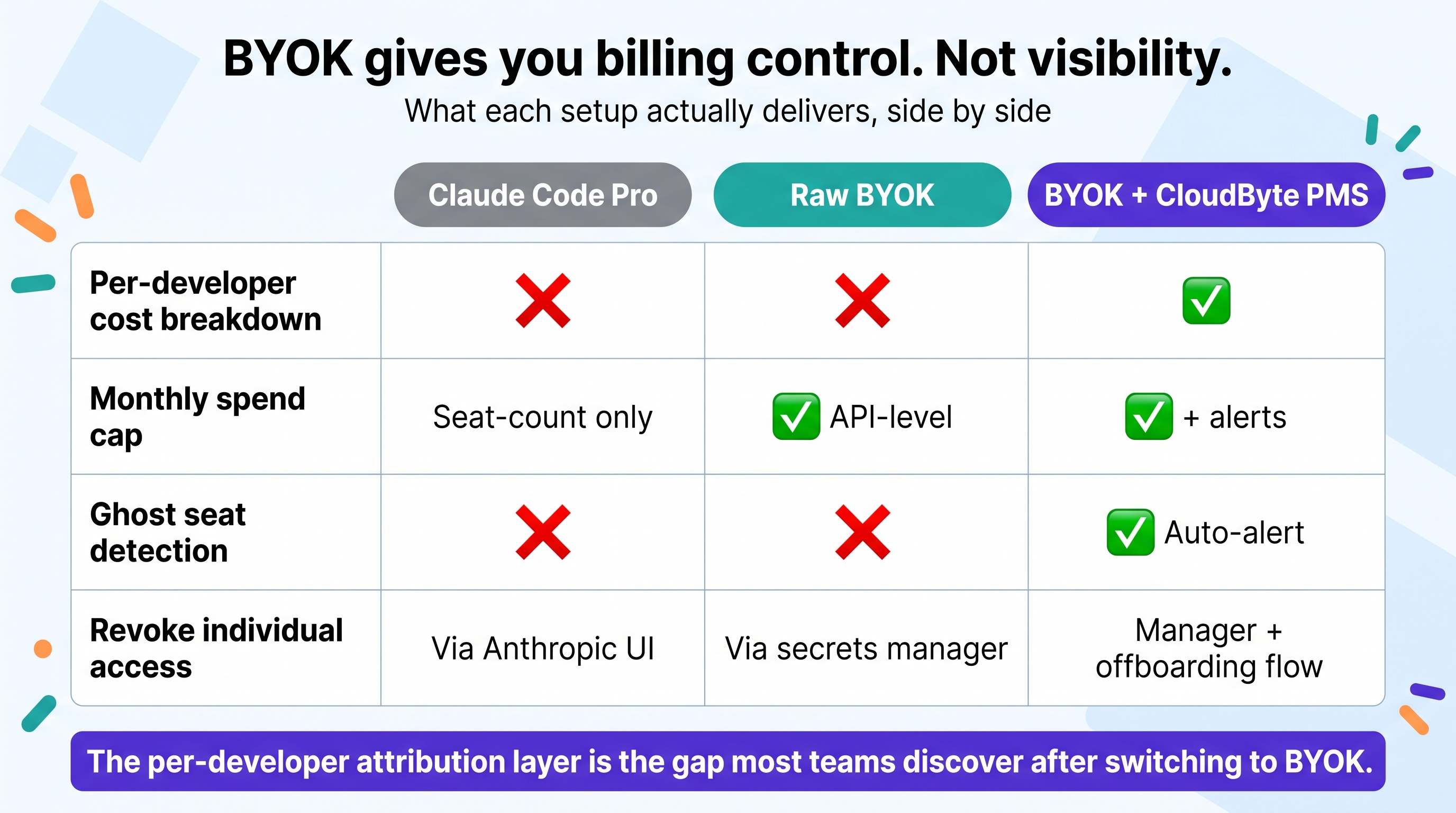
| Capability | Claude Code Pro (managed) | BYOK (raw API key) | BYOK + CloudByte PMS |
|---|---|---|---|
| Per-developer cost breakdown | ❌ | ❌ without extra tooling | ✅ |
| Per-project spend attribution | ❌ | ❌ without extra tooling | ✅ |
| Monthly spend cap | Seat-count only | ✅ API-level cap | ✅ API cap + dashboard alert |
| Ghost seat detection | ❌ | ❌ | ✅ Auto-alert |
| Revoke individual developer access | Via Anthropic seat management | Via secrets manager rotation | Via secrets manager + PMS offboarding flow |
| Rate limits | Managed (high) | API tier-based (scales with spend) | API tier-based |
| Data residency control | Anthropic-managed | Organisation-managed | Organisation-managed |
| Onboarding complexity | Low | Medium | Medium (one sync agent install) |
| Claude Code feature parity | Full | Full | Full |
The raw BYOK setup gives you billing control but not visibility. The Anthropic Analytics API shows aggregate token counts, not which developer ran the session, which repo they were working in, or whether the spend correlated with shipped code. The per-developer attribution layer is the gap most teams discover after switching to BYOK.
BYOK also does nothing on its own to flag a licence nobody is using. See Ghost Seats: How to Find and Reclaim Unused AI Coding Licences for how the "Ghost seat detection" row above actually gets automated.
What are the risks of unmanaged BYOK across a developer team?
Unmanaged BYOK, where developers configure their own API keys or share a single key without a secrets manager, creates three compounding risks: overspend with no attribution, key leakage into source control, and silent breakage when keys expire or are rotated.
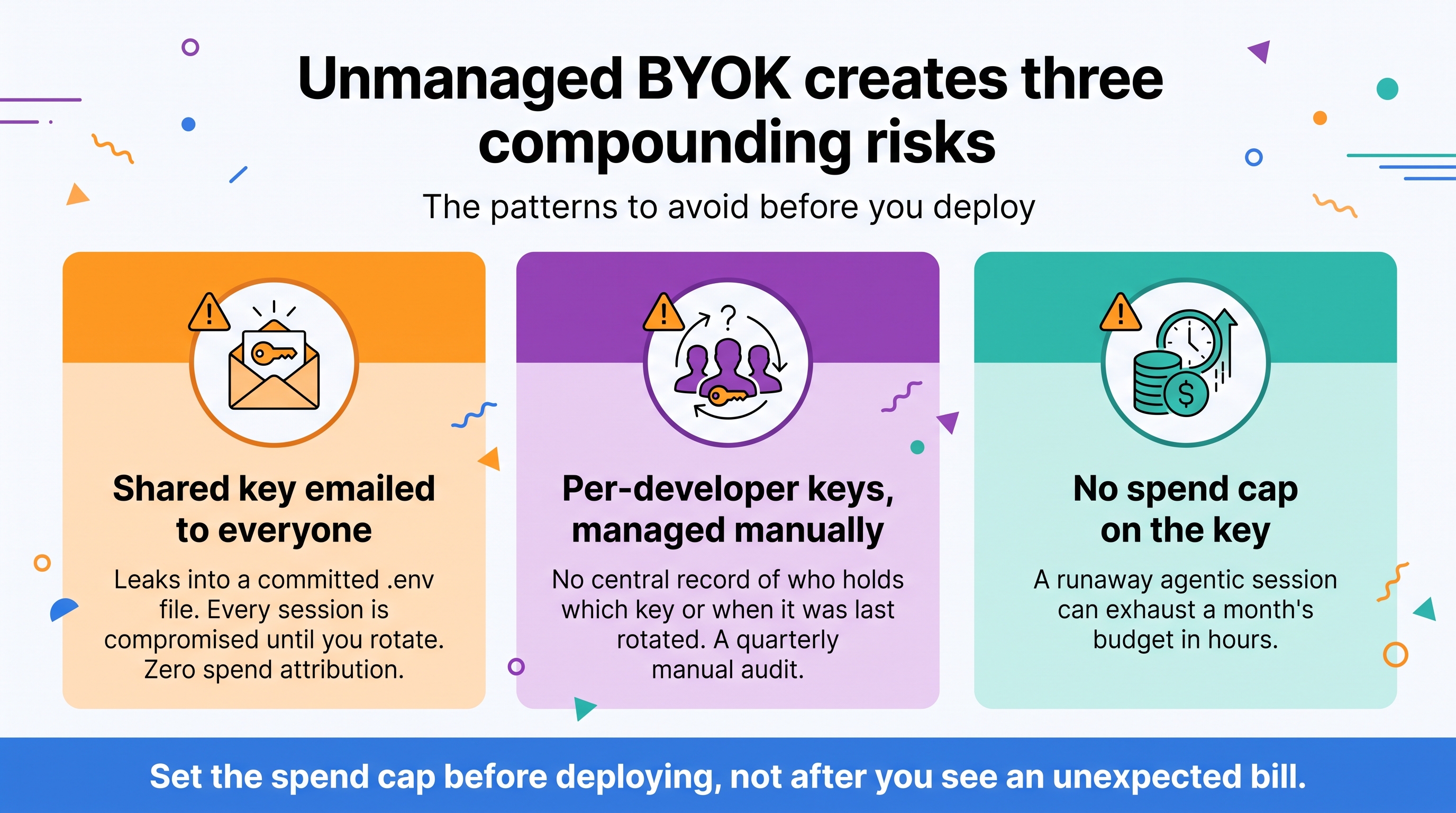
The three patterns to avoid:
One shared key emailed to everyone. This is the most common BYOK anti-pattern. When it leaks into a .env file committed to a public repo (a routine occurrence: GitHub's secret scanning catches thousands of Anthropic keys weekly), every Claude Code session across your team is compromised until you rotate. The shared key also provides zero spend attribution.
Per-developer keys managed manually. Better for revocation but creates an audit gap. You have no central record of who holds which key, when keys were last rotated, or whether a former developer's key was actually revoked. In a 20-person team, this is a quarterly manual audit.
No spend cap on the key. Agentic Claude Code tasks, especially loops that retry on failure, can consume millions of tokens in a single session. Without a hard spend cap, one runaway session can exhaust a month's budget in hours. Set the cap before deploying, not after you see an unexpected bill.
Key scanning tip. Add a pre-commit hook that scans for sk-ant- patterns before any commit reaches your remote. GitHub, GitLab, and Bitbucket offer native secret scanning for Anthropic keys. Enable it at the org level.
How do you track Anthropic API spend per developer on BYOK?
To attribute Anthropic API spend to individual developers, deploy a session-capture agent that intercepts Claude Code sessions and records developer identity, project path, model used, and token counts alongside each API call. This is the data the Anthropic Analytics API does not provide.
The four components of a working BYOK cost-tracking stack:
1. A shared org-level API key deployed via a secrets manager so all sessions flow through a single, auditable key.
2. A session-capture agent on each developer machine. This is a lightweight process (typically a background daemon or IDE extension hook) that fires when a Claude Code session starts, records the developer's git identity, the active repository and branch, and listens for Claude Code's local session output to capture token counts.
3. A central store where session records land — a Postgres table or data warehouse with columns for developer_id, project, date, model, input_tokens, output_tokens, cache_hit_tokens.
4. A cost calculation layer that multiplies token counts by Anthropic's published per-million-token rates and aggregates by developer, project, and time period.
In CloudByte PMS, this stack ships pre-built: the sync agent instruments Claude Code sessions automatically, token data flows to the PMS dashboard, and engineering managers get per-developer spend breakdowns with no manual SQL. See how the API cost tracking works →
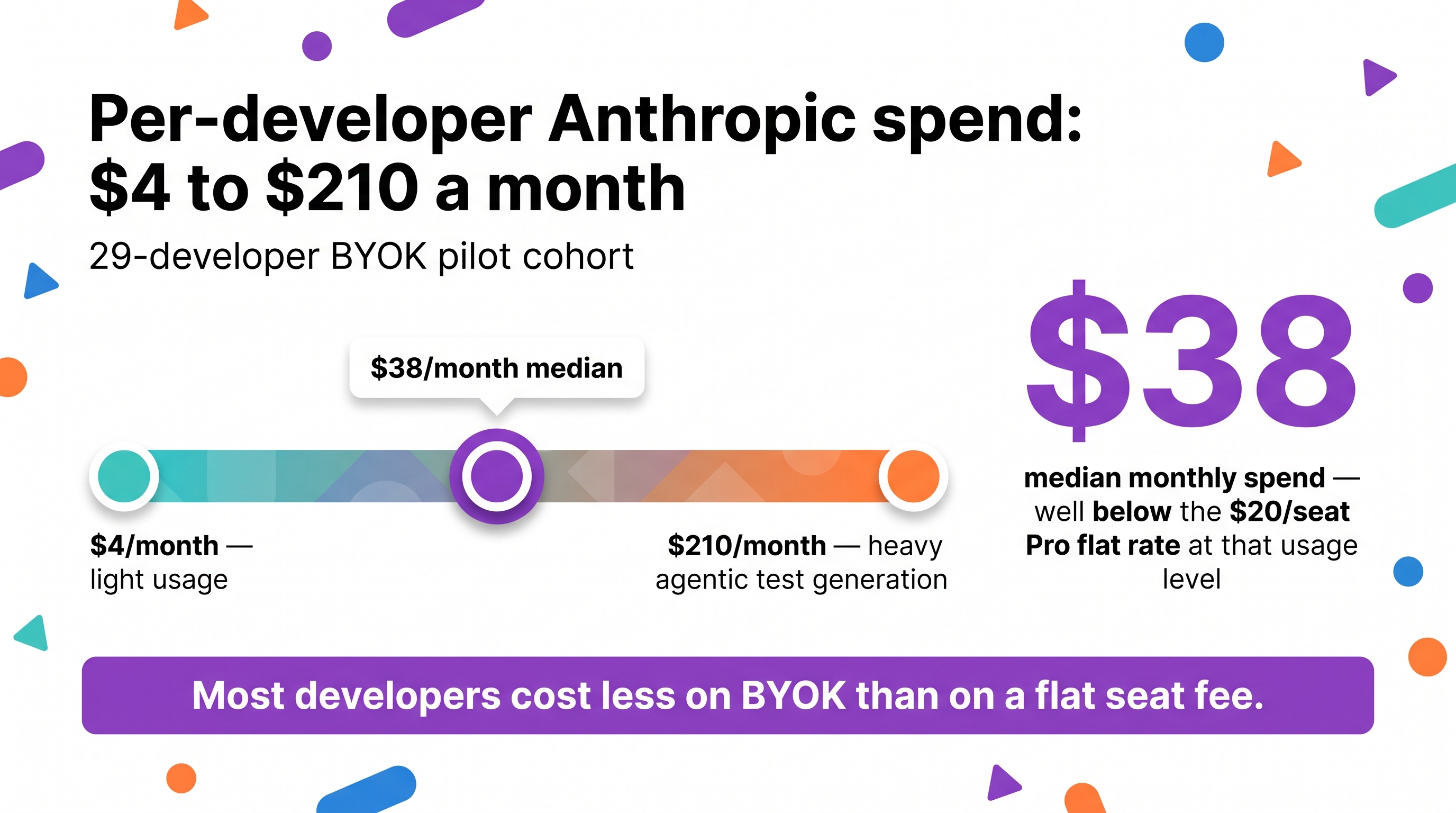
In our 29-developer pilot cohort, per-developer monthly Anthropic API spend ranged from $4 (a developer working mainly in a non-AI context) to $210 (a developer doing heavy agentic test generation). The median was $38/month, well below the Claude Code Pro flat rate at that usage level, making BYOK the cost-optimal choice for most of those developers.
FAQ: BYOK for Claude Code and Anthropic API keys
What does BYOK mean for Claude Code?
BYOK (bring your own key) for Claude Code means configuring the tool to use your organisation's Anthropic API key instead of Anthropic's managed Claude Code subscription. Usage is billed at API rates directly to your Anthropic account, giving you full token-level visibility and spend control.
Is BYOK cheaper than a standard Claude Code subscription?
Not always. BYOK is cost-effective for developers who average light-to-moderate usage (under ~600K input tokens/month on claude-sonnet-4-6). Heavy users exceed that threshold and are cheaper on Claude Code Pro's flat $20/seat rate. Audit actual token consumption before switching. The crossover point varies by how heavily your team uses agentic workflows.
How do I set up BYOK for my team on Claude Code?
Set ANTHROPIC_API_KEY in each developer's shell environment via a secrets manager. Do not email or commit the raw key. Configure a monthly spend cap in the Anthropic Console before deploying. Verify usage appears in the Anthropic Console → Usage tab after the first developer session.
How do I attribute Anthropic API spend to individual developers on BYOK?
Anthropic's Analytics API shows aggregate spend by model, not per developer. Attribution requires a session-capture agent that records developer identity and project alongside token counts for each Claude Code session. CloudByte PMS instruments this automatically, mapping every session to a developer and codebase.
What happens if a developer leaves and they have access to the team API key?
Rotate the key immediately. If deployed via a secrets manager, rotation is a server-side operation. No action required on the departed developer's machine. Never give developers the raw key value; always inject via a secrets manager so revocation doesn't depend on the developer cooperating.